Inspiring
May 16, 2018
Answered

Presenter Output is Blank in the Browser

  • May 16, 2018
  • 1 reply
  • 3893 views

Hi All,

I am using Adobe Presenter 9.

When I Publish the project, it shows Blank page in the Chrome and Firefox Web Browser, but it does work in Internet Explorer.

Would appreciate any help to resolve this issue.

Also, really like to know, is there a way to output in HTML5 Format?

Because many web browsers are giving error for SWF files and do not support Flash Plugins.

Thanks so much.

This topic has been closed for replies.
Correct answer Jorma_at_CoSo

Hm, I guess my brain is rusty on the options for Presenter 9. If I recall it was set up to use an App (discontinued) for mobile viewing of presentations.

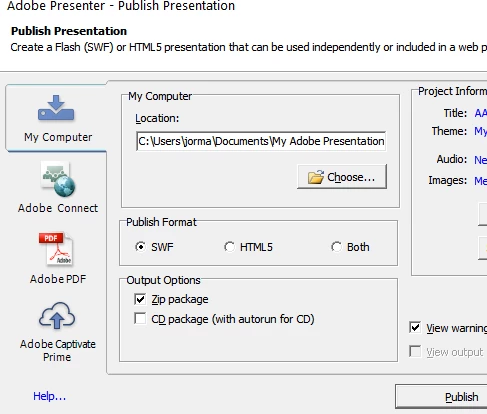
I believe you would need to update to a newer version of Presenter to get the option to publish to HTML.. Currently the publish dialog looks like this:

1 reply

Jorma_at_CoSo
Legend
May 16, 2018

Presenter 9 should have the option when publishing your presentation to output as Flash, HTML or both.

Without seeing your project it is hard to diagnose the problem. It could be something as simple as a corrupt object on one of the first couple slides (try removing/replacing the images on the slides) or it could be a compatibility issue with your version of PPT and Presenter 9. Presenter 9 was built to work with Office 2007 to Office 2013. If you are using Office 2016/365 there could be compatibility issues.

Can you share a link to your published presentation?

AixtronAuthor
Inspiring
May 16, 2018

Hi There,

I am using Office 2013 with the Presenter 9 (Part of Adobe Technical Communication Suite).

Here is the Screenshot of Publish window. No option for HTML Output.

Appreciate your help.

Jorma_at_CoSo
Jorma_at_CoSoCorrect answer
Legend
May 16, 2018

Hm, I guess my brain is rusty on the options for Presenter 9. If I recall it was set up to use an App (discontinued) for mobile viewing of presentations.

I believe you would need to update to a newer version of Presenter to get the option to publish to HTML.. Currently the publish dialog looks like this: