Participant
October 18, 2016
Question

Presenter>Prime - no connection

  • October 18, 2016
  • 6 replies
  • 22798 views

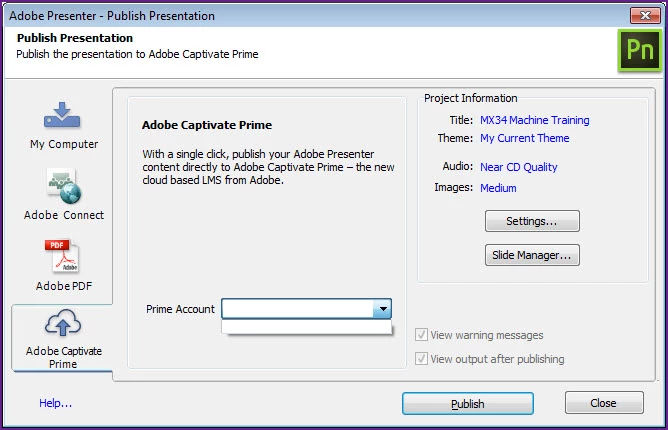
I am unable to connect Presenter to Prime when attempting to publish from Presenter. The prime drop down is blank. Note: Captivate connects fine on my PC.

This topic is closed to new replies. Start a new post to keep the conversation going.

6 replies

Inspiring
January 16, 2019

Does anyone have an answer to this issue? I verified the correct string in the regestry.

eLearning_Pundits
Participating Frequently
March 30, 2018

Not sure if you were able to fix the issue, but I tried it several months ago and got this working. Try the steps below:

Open registry  on your computer and got  the location below

HKEY_CURRENT_USER\SOFTWARE\Adobe\Adobe Presenter\11.0\PrimeAccounts

Create a new string with a name StartURL and add the value as https://captivateprime.adobe.com/inappstarter.html

zeeshan hussain
Adobe Employee
Adobe Employee
October 19, 2016

Hi Marc,

Since you would be publishing first time to Adobe Captivate Prime from Presenter, there will be no entries for your Prime account.

You should click on Publish button and publish your project to you Prime account.

From next time onwards, you will directly be able to select the Prime account from the drop down,

Regards,

Zeeshan Hussain
Adobe Presenter Engineering Team

Participant
October 19, 2016

After I click Publish a window appears but the file is never published. Note: OK button is greyed out (Not Shown).

Participant
November 11, 2016

I am experiencing the exact same issue.