Participant
September 29, 2009
Answered

Prevent Adobe Captivate from continuing to next slide

  • September 29, 2009
  • 1 reply
  • 971 views

Hello all and thank you in advance for any and all replies.

I have been using Adobe Captivate 4 for a bit and believe I do know what I am doing but I am stumped on this one.

I am creating a troubleshooting guide for our users. The slide has a button that calls some javascript to open the Network Connections window instead of directing them to it.

(function runApp() {
var shell = new ActiveXObject("WScript.shell");
shell.Run("control.exe ncpa.cpl");
}

runApp();
)

After they do their check, they have a question that is asked of them with a Yes/No with a jump to slide option for each one.

Now when they click the Javascript button the window opens fine and the slide remains. But if they click the button a second time, the slide automatically goes to the next one.

I have set the slide properties to "No Action" on Exit and I have even tried infinite/100 clicks on the java button and the slide still goes to the next one.

I have even tried hiding a click button on the slide with a "No Action" on success or failure to no avail.

Is this a bug or am I missing something ??

Thank you again in advance !

Serge
This topic has been closed for replies.
Correct answer RoboWizard

Hi there

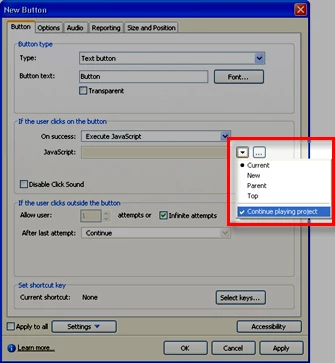
When you look at the properties of your button, did you ensure you cleared the checkmark from the "Continue playing project" option?

Cheers... Rick

Helpful and Handy Links

Captivate Wish Form/Bug Reporting Form

Adobe Certified Captivate Training

SorcerStone Blog

Captivate eBooks

1 reply

Erik Lord
Inspiring
October 1, 2009

Is it worth doing something like putting a specific stop action at the end of the slide?

Erik

Participant
October 1, 2009

Ideally, yes.

The slide itself (and others like it) are to help people troubleshoot their network connections.

So the JAva button opens up their Network Connections window in Windows and based of what they see in there, they can

answer the Yes/No question. Since they can't keep the slide on long enough to do both, it becomes pointless.

Considering all this, I am tempted to put the Java button on a seperate slide and then have them go to the question slide afterwards...

I just found it really weird how Captivate forces the slides to continue....

RoboWizard
RoboWizardCorrect answer
Inspiring
October 1, 2009

Hi there

When you look at the properties of your button, did you ensure you cleared the checkmark from the "Continue playing project" option?

Cheers... Rick

Helpful and Handy Links

Captivate Wish Form/Bug Reporting Form

Adobe Certified Captivate Training

SorcerStone Blog

Captivate eBooks