Participating Frequently
March 26, 2014
Question

Prevent Users From Retaking Quiz

  • March 26, 2014
  • 2 replies
  • 1373 views

Good Afternoo,

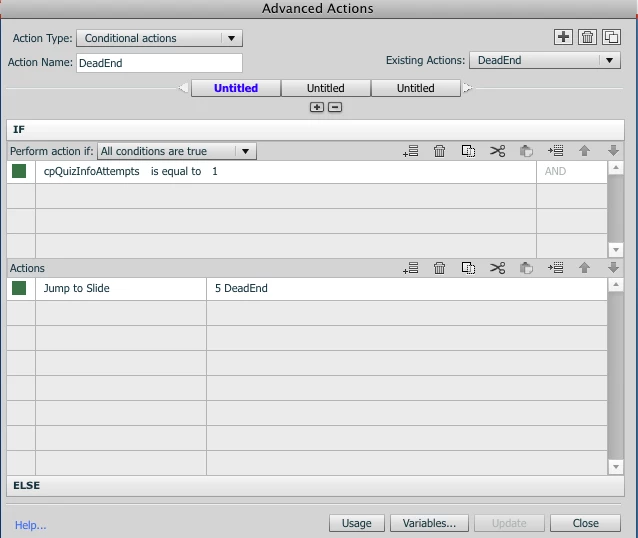
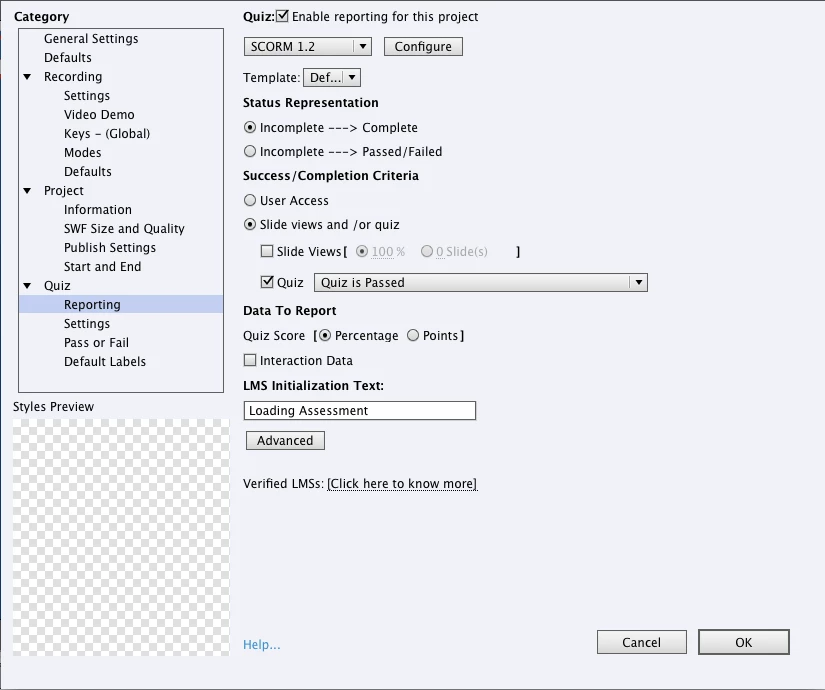
I have a module that I do not want the users to retake the quiz after they have taken the quiz one time. The users need to get a 90 percent to pass for completion. Also I would like to use a advance action that checks the number of attempts and if it is equal to 1 then they them jump to another slide stating that they have already taken this quiz. 

See my screen shots below of my setting and my advance actions. My question is is there something I am missing? Because everytime I upload this on our LMS I continue to be allowed to take the quiz again.

Thank You for your help

Captivate 6

Mac OSX 10.6.8
This topic has been closed for replies.

2 replies

f_barnesAuthor
Participating Frequently
April 4, 2014

Thank you all for the input, I agree this end would have to be determined by the LMS unfortunately our LMS does not do that. However I got it work with by have the scormdriver.js changed to talk to our LMS and say that the user have taken the quiz once preventing them to re enter the quiz.

Lilybiri
Legend
March 26, 2014

Why not just put the number of attempts on Quiz level to 1? And don't allow Review.

About your advanced action: you don't tell how you do trigger this action. You have to know that the system variable that you are using is set to 1 when the first question slide is entered. If you allow only one attempt, that variable will always keep that value 1.

Lilybiri

RodWard
Community Expert
Community Expert
March 27, 2014

The Captivate output does not 'remember' how many times the module has been launched or what the learner's score was.  Tracking user interaction with learning modules is the role of the LMS.

So you should really be setting the number of attempts in Captivate to 1, and then setting the number of launch attempts in the LMS to 1 as well.  If the learner does not pass the module on their first attempt, Captivate will require them to relaunch, but then the LMS will have seen they've done one launch already and prevent the second launch.  Your LMS administrator should be able to configure this for you.