


Question
Printing Handout, Lesson, Step-by-Step, and Storyboard
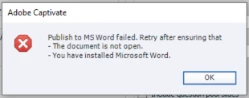
We are having a problem with our Adobe Captivate software, where it will no longer print project handouts, lessons, step-by-steps, and storyboards, because Captivate uses .DOC Word files as the template and we can no longer open that file type with our enterprise upgrade to Office 365. Even if we upgrade or replace the template files with .DOCX files, the Captivate application only allows the selection of .DOC files.
Is there a way to change the Captivate template file type to .DOCX?
Template Directory
C:\Program Files\Adobe\Adobe Captivate 2019 x64\Gallery\PrintOutput
Error Message
 AdChoices