


trevorw65891536
Participant
March 12, 2019
Question

Problem installing Captivate

  • March 12, 2019
  • 1 reply
  • 396 views

Hi all,

Everything goes as well as intended until it gets to the setup. The 2GB package that you download from the site extracts fine, but when it gets the the setup the window is too small to do anything with. The window cannot be resized and there is no button visible that allows me to continue.
Screenshot:
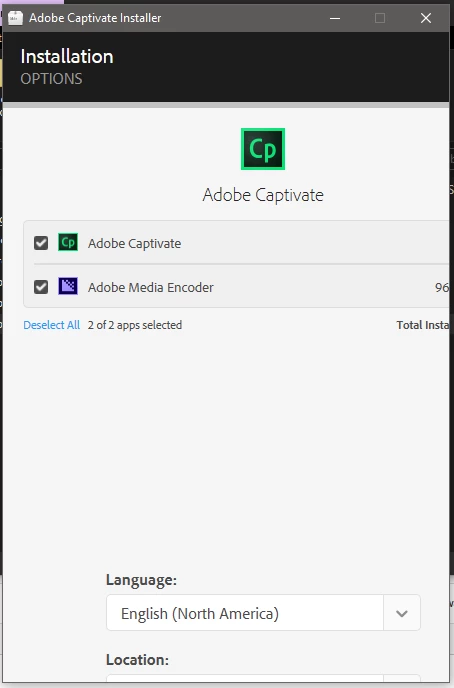
Its not that I have too small of a screen to use it properly, I have 2 1080p screens extended together (one is vertical, don't know if that info will be helpful, it does cause Krita to act a little weird for me). I also have the creative cloud app installed (window size looks like its from there).

System specs:

OS:       Windows 10

CPU:     Core i-5 4460

GPU:     NVidia GTX 1050ti(Horizontal main monitor), Intel graphics(Vertical monitor)

RAM:     8GB

Let me know if any more info is needed

This topic has been closed for replies.

1 reply

RodWard
Community Expert
Community Expert
March 12, 2019

Reduce your Display Percentage setting in Windows.  You're probably using high density monitors and these make everything look too small so you've cranked up the display percentage above 100% and this is causing issues with the install dialogs in Captivate.

trevorw65891536
Participant
March 19, 2019

My display percentage is at 100%. It does this anyway. Interesting note, When I change the scaling, it just makes the window bigger but does not change how much I can see.

RodWard
Community Expert
Community Expert
March 19, 2019

My gut feeling is that something about your unusual monitor setup is affecting this. 

Have you tried unhooking from your secondary display and just using the main horizontal display only?  What resolution is that set to?