


Known Participant
December 18, 2018
Answered

Problem to set variable decimal characters to 3

  • December 18, 2018
  • 5 replies
  • 1992 views

Hello everyone!

I have a little problem with displaying the content of a variable.

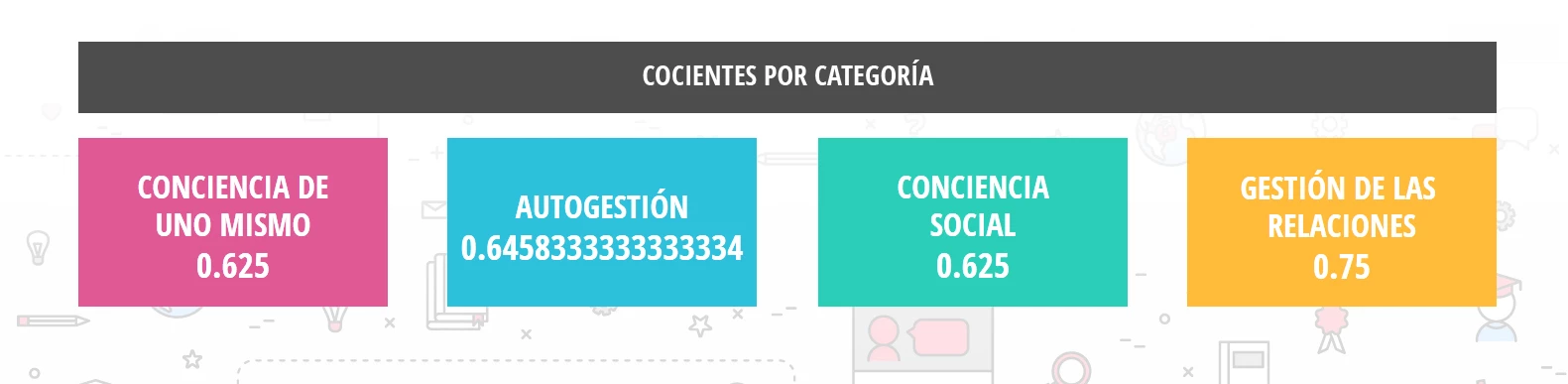
I have a self-made survey, which ends with a slide that must show 4 results. Each of them, are stored in 4 variables. This results are numbers that are in between 0 and 1.

When a number like 0.666666666667 appear, I need it to be shown as 0.66 or 0.67 (it doesn't matter if it's just cropped). When I setted the variable, I put 3 as the maximum number of characters, but when I previewed it, it shows more numbers (you can see it in the capture).

Is there anyway to set it up to show just 2 decimals, and not every of them?

Thank you in advance!

I'm using Captivate 2019, with the last update.
This topic has been closed for replies.
Correct answer dan561

Oops, my bad. One little thing needs to be added to make the round function work:

varcat1_2decimals = Math.round(var_categoria1 * 100)/100;

5 replies

Participating Frequently
November 13, 2019

Can you give just the javascript command exactly how I need to input? The numbers are just not rounding

Known Participant
September 7, 2020

Hi

Did you manage to solve the javascript command issue? I am having the same issue in wanting to round a Captivate variable to two decimal places - getting nowhere fast!

Known Participant
September 7, 2020

Managed to get the Captivate variable 2 decimal places result I needed by using the following
(with a kind nod to Paul Wilson and his contact!):


window.cpAPIInterface.setVariableValue
("myVarNam",Math.floor(myVarNam * 100) / 100);

dan561Correct answer
Inspiring
December 19, 2018

Oops, my bad. One little thing needs to be added to make the round function work:

varcat1_2decimals = Math.round(var_categoria1 * 100)/100;

milpinkfAuthor
Known Participant
December 19, 2018

Great!

Worked like a charm!

Thank you, thank you, thank you!

Inspiring
December 19, 2018

I assume those values are stored in variables - I'll call them var1, var2, var3 ....

On Enter of the slide, execute Javascript

//First get your value from Captivate to JS:

var1 = window.cpAPIInterface.getVariableValue("var1");

//To round to 2 decimal places you multiply each value by 100, round it to a whole number, then divide by 100:

var1Rounded  = round(var1 * 100);

var1_2decimals = var1Rounded/100;

//Or combine that in one line:

//var1_2decimals = round(var1 * 100)/100;

//Send that back to Captivate:

window.cpAPIInterface.setVariableValue("var1", var1_2decimals);

//Repeat for the other variables

Paul Wilson CTDP
Community Expert
Community Expert
December 18, 2018

Maybe you can make use of the knowledge in this video. Adobe Captivate - Progress Indicator as a Percentage - YouTube

Paul Wilson, CTDP
RodWard
Community Expert
Community Expert
December 18, 2018

Yes this can be done if your content output is HTML5 and you are willing to invest in the CpExtra HTML5 widget.

Take a look at this page:

Math Related | Infosemantics Pty Ltd

The function you need is related to xcmndRoundTo

If you don't want the widget, you'll need to work out how to do the math using JavaScript.

milpinkfAuthor
Known Participant
December 18, 2018

Hi Rod! Thank you for the quick response!

Unfortunatelly I cannot invest in the widget.

I'll see if I can find someone to help me with JS, 'cause I don't think I'll be able to do it (my knowledge about JS is about 0 ).

Thank you so much again!

Lilybiri
Legend
December 19, 2018

Several functions/methods are available in JS to define the number of decimals. Do you want that number to be variable or fixed?

BTW, I never have seen a widget that was so powerful as CpExtra. Its cost is ridiculously low compared with the many hours of time you would save by avoiding a lot of scripting.