Known Participant
October 15, 2018
Answered

Problem with Go to Next Slide On success in Customed Quiz

  • October 15, 2018
  • 1 reply
  • 1284 views

Hello everyone!

I've a totally customized Hot Spot Quiz Slide. I have 12 buttons, only 3 of them are correct. You have 3 attempts to do it right. In each attempt, you score a different number of points (First attempt 3, second 2, in the last 1).

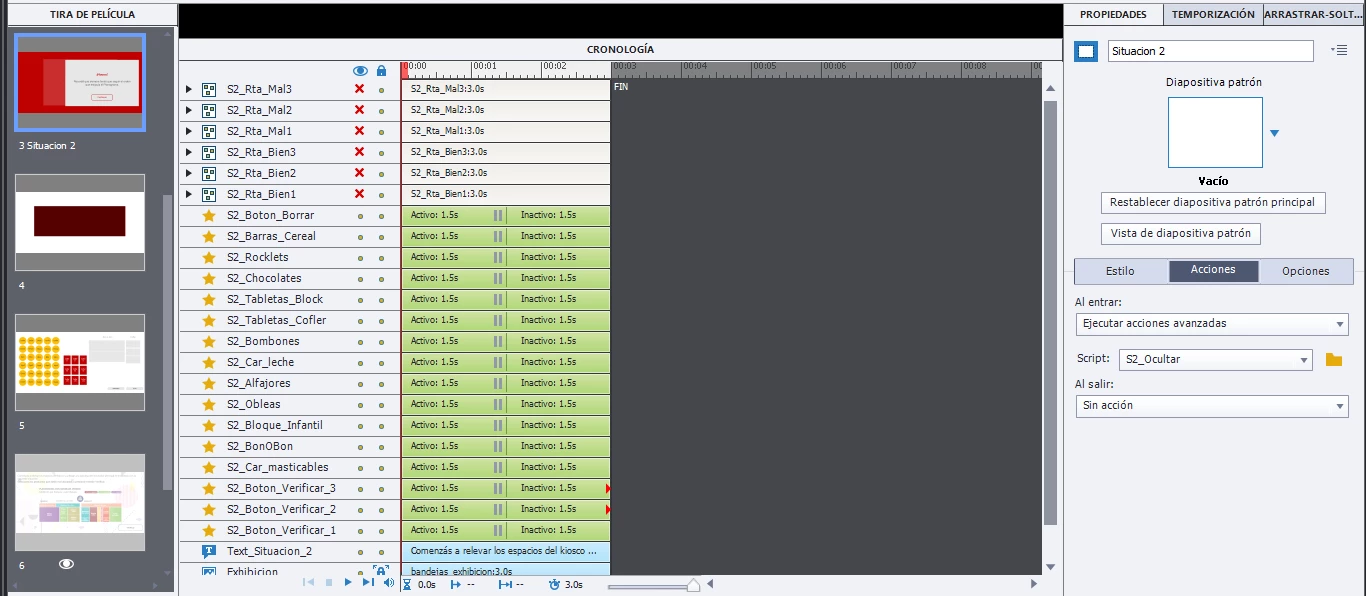
I've setted up (as you can see in the image (sorry it's in spanish)):

- The first 3 elements, are the 3 kind of wrong responses. In the group I've a background, a smart-shape with text, and a button. In this buttons, I have an Advance Action, to reset all the buttons of the quiz back to 0. (a variable is setted for each quiz element). In the last wrong message, you get the Correct Answer and the exit button will Go to the next slide.

- The next 3 elements, are the 3 correct messages. In this groups, I have a button, which "On success" with Go to the next slide, and score points (I've included the button on the test, and bring to the total a different amount of points, if you're in the first attempt correct message, and so on).

The validation of the answers works well. You can make every attempt, and get the message according to the attempt. But all the buttons that are supposed to Go to the next slide, do nothing.

After this slide, I've a Drag and Drop slide, and then the Results Slide.

How can I solve this?

Thanks in advance!
This topic has been closed for replies.
Correct answer RodWard

Thank you for taking the time.

I wasn't able ('cause a lack of knowledge) to put in one button all the attempts.

So, you click in the verify answer, with this Advanced Action:

The correct answer has a button with: On Sucess, Go to the next slide.

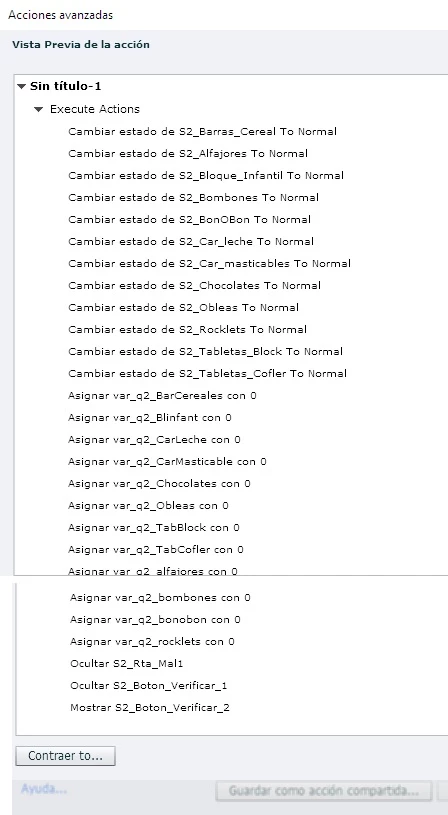
The wrong answer has a button with the following advanced action:

You'll note, I'm Hidding Verificar 1, and showing Verificar 2. Like I said before, I wasn't able to put in one button all the attempts, so I'm limiting this "attempts", by this Verify buttons.

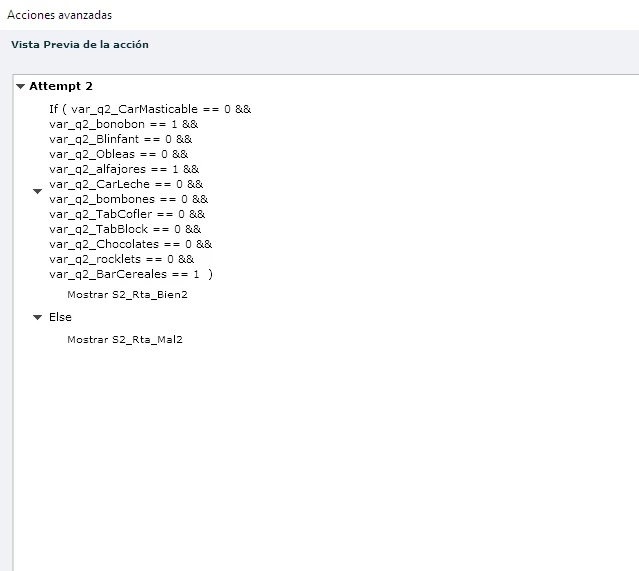
In the Verify 2 button, the attempt 2 advanced action is triggered.

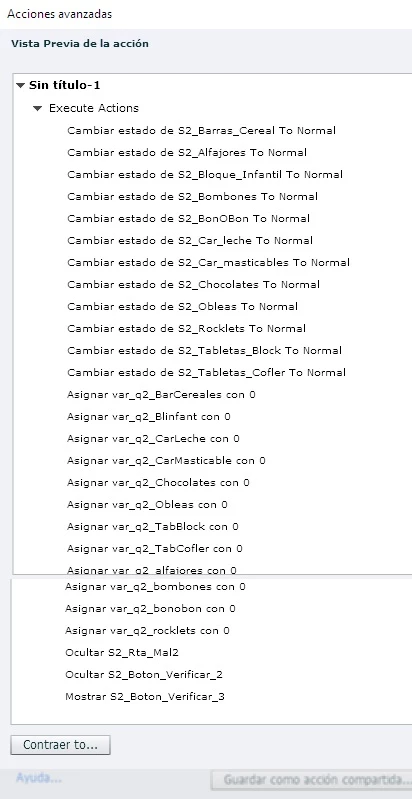
Correct answer group has a button with Go to the next slide, and the wrong one has this advanced action:

Again, I'm Hidding Verificar 2, and showing Verificar 3. This give me the last attempt.

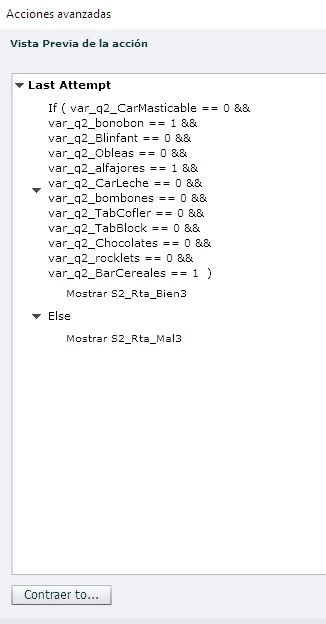
Correct answer group has a button with Go to the next slide, and the wrong one "Go to the next slide" as well, because you don't have more attempts.

I have 3 actions with ELSE actions, 'cause there're 3 attempts. I suppose there's a better way to do this, but I think it's out of reach for me.

The four buttons that are supposed to "Go to the next slide", 3 in the correct answers group, and 1 in the last wrong message, are the ones not working.


Are these buttons all positioned so that they are sitting on top of each other on the slide?  What I'm thinking is that your issue might be due to having buttons with hit areas all occupying the same space and even though you have HIDDEN the buttons that you don't want to be clicked you haven't DEACTIVATED them as well.  If a button is only hidden, it might be preventing the click on the button underneath.

As a test, try moving the buttons on the slide slightly so that they are NOT overlapping and then try your interaction again.  If it then works, my theory might be correct.  To resolve it you would need to add more actions into your Conditional Actions so that when a button gets hidden it also is deactivated, and when it gets shown it should also get Activated too.

If the interaction still does not work even when all buttons are using different hit area space, then my next theory would be that your issue is related to a design flaw in your interaction logic.  Your conditions have become so complex that all it takes is for ONE of the variables to have the wrong value and nothing works.  You may need to go back to square one and build up from a very simple interaction again.

1 reply

Lilybiri
Legend
October 15, 2018

You show only that an advanced action is triggered by the On Enter event, but not the advanced action, nor the setup of the buttons. Do you use muitistate objects for the feedback messages?

milpinkfAuthor
Known Participant
October 15, 2018

Hi Lily, sorry for that.

1) In the Enter event, I only have an advance action that hides 2 buttons that appear later on. They are working well.

2) The buttons (12) that are part of the Hot Spot interaction, have all the following advanced action:

This buttons have 2 states, Normal, and Selected.

If the variable is 0, change the state to Selected, and assigns 1. ELSE, change the state to Normal, and assign value of 0 to the variable. This allows to unselect the buttons.

2) The button that verifies the selection and give the correct/incorrect message, have the following advanced action:

IF all the conditions are true, shows the first Correct message, ELSE the wrong one.

3) All this messages (correct, incorrect), are compound by a smart-shape as background, another smart-shape with the message, and a smart-shape that says "Continue". If you're correct, it should go to the next slide (which is the problem), if not, it returns to the exercise, to keep on trying (this one works well).

This Continue button is just a button with an state of mouse-over, I don't change it's state during the exercise.

This button is supposed to go to the next slide On success, and is included in the test, with 3 points that are added to the total score. This is the button with the issue. You click it, and does nothing.

Thank you!

Lilybiri
Legend
October 15, 2018

It is very difficult to 'read' an advanced action if you cannot see it fully. Did you never learn to use the Preview button for actions? It is the first button (arrow) in the top right control panel. I explained all the functionality of the Advanced actions dialog box in this blog post:

http://blog.lilybiri.com/advanced-actions-dialog-box-in-captivate-2017

It is not the language that is bothering me, but I don't get the full picture.