
Inspiring
January 2, 2018
Answered

Problem with how matching questions display in HTML5 (Captivate 9)

  • January 2, 2018
  • 6 replies
  • 1362 views

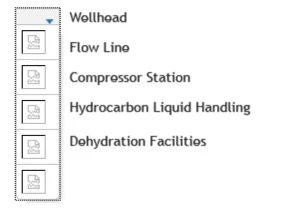
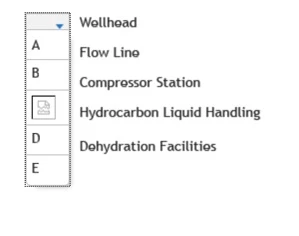
I have a non-responsive project in Captivate 9 that I have to publish to HTML5 output, and I'm having a problem getting matching questions (knowledge checks) to display properly. The answer choices do not usually show up in the dropdown menu. Sometimes they will show up if I click past the page and then go back to it, but it's very inconsistent behavior. I've tested on SCORM Cloud in Internet Explorer, Firefox, and Chrome. Please see the screenshots below. I appreciate any help anyone can offer! I can't swap these out for drag and drop due to accessibility concerns, and I'm not an advanced user so if you have an advanced solution, please explain step by step! Thank you!

On page load:
After advancing to the next slide and returning:
    This topic is closed to new replies. Start a new post to keep the conversation going.
    Correct answer R_H__

    We have a very similar issue with Fill in the Blank questions when publishing to HTML5. When viewing the final output, often the drop down menus would contain broken image links instead of text.

    We have found a solution... but it makes absolutely no sense. Putting the Fill in the Blank questions into the project via a Random Question Slide instead of just a standard question on the filmstrip makes the drop downs appears correctly every time.

    We do this now for all our Fill in the Blank Qs:

    • Make Fill in Blank question
    • Send Question to it's own pool (right click on Q in filmstrip to do this)
    • Insert a Random Question slide in it's place in the filmstrip
    • Assign Pool containing 1 question to Random Question slide

    I'm not sure about Knowledge checks, but if you can bring them into the project the same way, it might work for you also.

    Sorry, I would have given more specific details but I can't use my Captivate right now. I pressed clear cache and am still waiting for it to finish almost 2hrs later.

    6 replies

    R_H__
    R_H__Correct answer
    Inspiring
    January 11, 2018

    We have a very similar issue with Fill in the Blank questions when publishing to HTML5. When viewing the final output, often the drop down menus would contain broken image links instead of text.

    We have found a solution... but it makes absolutely no sense. Putting the Fill in the Blank questions into the project via a Random Question Slide instead of just a standard question on the filmstrip makes the drop downs appears correctly every time.

    We do this now for all our Fill in the Blank Qs:

    • Make Fill in Blank question
    • Send Question to it's own pool (right click on Q in filmstrip to do this)
    • Insert a Random Question slide in it's place in the filmstrip
    • Assign Pool containing 1 question to Random Question slide

    I'm not sure about Knowledge checks, but if you can bring them into the project the same way, it might work for you also.

    Sorry, I would have given more specific details but I can't use my Captivate right now. I pressed clear cache and am still waiting for it to finish almost 2hrs later.

    Inspiring
    June 22, 2018

    Thank you so much! Sorry for the very long delay in my response; the project went on hold for a while. I had to completely remake my questions, because I had used Knowledge Check questions, and apparently those can't be sent to a pool. But once I started over, the steps you provided worked like a charm! At least they all look good in Preview mode, so I'm hoping they still do once I publish!

    I had to create multiple pools with one question each since my questions are interspersed throughout the content. For anyone else looking to do this, you can create question pools by going to Quiz > Question Pool Manager. (I had to look that up, so I figured I'd save someone a step.)

    Thanks again for your help!

    RodWard
    Community Expert
    Community Expert
    June 22, 2018

    Question pools that only have ONE question in each pool would not really give you any benefit (as far as I can see).  Each Randomised Quiz Question slide can only be attached to a single Question Pool.  If that pool only has one quiz question, then that is the only question that will be displayed when the learner reaches the Randomised Question slide.  Normally you would only use Question Pools when you want some chance of the learner seeing DIFFERENT questions from time to time.

    Am I perhaps misunderstanding what you are trying to do?

    EDIT:  Ah.  OK.  I see that you are doing this to get around the issue with the drop-downs.  If so, I would also suggest you log this as a bug with Adobe.  It should NOT be necessary to put questions in pools to resolve an issue like this. It sounds very much like a bug to me.