
Participant
November 27, 2015
Answered

Problem with master slide objects on new projects Captivate 8

  • November 27, 2015
  • 1 reply
  • 186 views

Hi All,

Recently when I've created a new project the master slide objects are all too big for the slide, not matter what sized project I select.  I have uninstalled and reinstalled the product several times and removed all files relating to the problem yet I still can't get it to work.
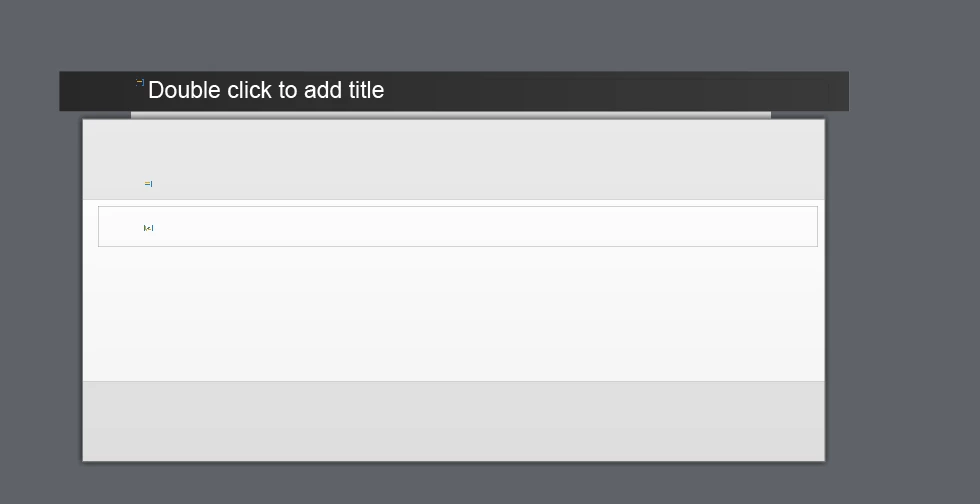
You can see here that the objects are all larger than the slide behind it leading to objects ending off the side when projects are published and previewed. 

When I try to do a responsive problem I get the opposite problem with the objects being far too small as shown here

Has anyone else had this problem>

This topic has been closed for replies.
Correct answer Lilybiri

'All files'? Are you sure that you deleted the Layouts folder in the Public documents, and refreshed the Preferences folder? The screenshot shows one of the default themes, did you customize that theme? Is it happening with all themes?

1 reply

Lilybiri
LilybiriCorrect answer
Legend
November 27, 2015

'All files'? Are you sure that you deleted the Layouts folder in the Public documents, and refreshed the Preferences folder? The screenshot shows one of the default themes, did you customize that theme? Is it happening with all themes?

Participant
November 29, 2015

Thank You!  It must have been in the layouts folder!  I had already refreshed the preferences folders.!