Participant
May 1, 2014
Question

Problem with Skillport Bookmarking and Captivate

  • May 1, 2014
  • 1 reply
  • 661 views

I performed several publication tests on Skillport LMS using a new Captivate file. This file was composed of a few blank pages and a few questions. With those tests, I detected a communication problem between Skillport and Captivate which always occurs in the following scenario:

On Skillport, a learner leaves a course on the last page. Skillport bookmarks that page so that, when the learner comes back to the course, it opens up on that same last page. But in the meantime, an update of the course is performed to delete the last pages. When the learner returns to the course, (I suppose) Skillport attempts to reach the above-mentioned “last page”...that no longer exists! As a result, the quiz systematically “freezes” (i.e. it cannot be completed nor reinitialized).

One way to prevent this bug is to deactivate the Captivate function that enables Skillport to record a bookmark. Another way is to perform a new update of the course to restore the last pages that had been deleted!

Is there a another way to solve this bug?

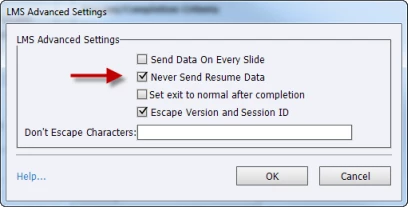
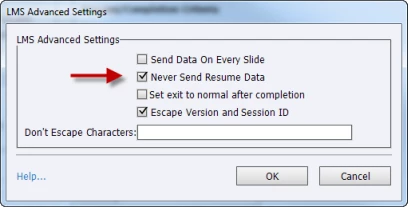
The only way to debug the Captivate course consist in activating the Never Send Resume Data option. This option has the disadvantage of disabling the bookmarking.
    This topic has been closed for replies.

    1 reply

    TLCMediaDesign
    Inspiring
    May 1, 2014

    I'm a bit confused by "in the meantime, an update of the course is performed to delete the last pages." What do you actually mean by this? How a pages being removed?

    I would not classify this as a bug at all. Captivate bookmarks the last page a user was on when they left to course. It also has a record of the furthest oint accessed in the course.

    You could always set a bookmark in Captivate to a page that still exists. You would need to execute JavaScript on the button or whatever means the user exits the course. You could add JavaScript to the onunload attached to the body tag to set a bookmark as the browser is closing.

    EmeraudeAuthor
    Participant
    May 6, 2014

    I notified the Skillport technical support team about the freezing of the quiz following an update that included the deletion of slides. Here is the answer that Skillport gave me on this issue:

    This is usually why we advise publishing it as a new course whenever you make any sort of structural changes, i.e. adding new pages, deleting new pages. Updating is typically there if you need to adjust a graphic, or a grammatical error, etc. So the same structure is there, just a small amount of material has changed.

    To overcome this limitation, I found a solution on the client side that solves the “frozen quiz” problem. I tested a SCORM function that allows resetting the bookmark recorded in Skillport, and that works well.

    On the first slide of a Captivate file, I added the following JavaScript code on a transparent button. I configured a hot key to call the JavaScript code.

    SCORM_CallLMSSetValue('cmi.suspend_data','');
    window.parent.close();

    If the quiz of a learner is completely frozen, he would have to go back to the first slide, and press the ALT + CTRL + R keys to reset the Skillport bookmark.

    On the last slide, I added the following JavaScript code on the On Exit event:

    SCORM_CallLMSSetValue('cmi.suspend_data','');

    If a learner exits the course while on the last slide, the bookmark will be reset. If the learner opens up the course once again, it will display the first slide.

    As a preventive measure, all courses mounted in Captivate and hosted on Skillport should have this feature. This would prevent having to generate a great amount of Skillport course codes in each update involving the addition or the deletion of pages.

    Reference:

    HELP! My Course is Freezing in Adobe Captivate Using SCORM Bookmarking

    http://captivatedev.com/2013/05/16/help-my-course-is-freezing-in-adobe-captivate-using-scorm-bookmarking/

    SCORM_CallLMSSetValue('cmi.suspend_data','') added on the first Captivate slide

    SCORM_CallLMSSetValue('cmi.suspend_data','') added on the last Captivate slide

    TLCMediaDesign
    Inspiring
    May 6, 2014

    I think I get what you are saying now about the deleted pages. Obviously you are able to push/delete files to the LMS without creating a new enrollment.

    What you are describing as an issue with Captivate would be an issue with any SCORM course that used bookmarking.

    You are basically changing the contents of a course mid-session.