
Problem with using click box to pause slide
Hi all,
I know this is a common topic of discussion, but I've been trawling for a solution and am still unable to find out what's going wrong with my slide.
I have added a click box with a pause in order to stop the slide from automatically advancing (a constant source of annoyance). However, this is not working and I'm guessing it's due to some issues relating to a lightbox-style popup interaction I've created on this particular slide.
Here's a screenshot of my current slide timeline:
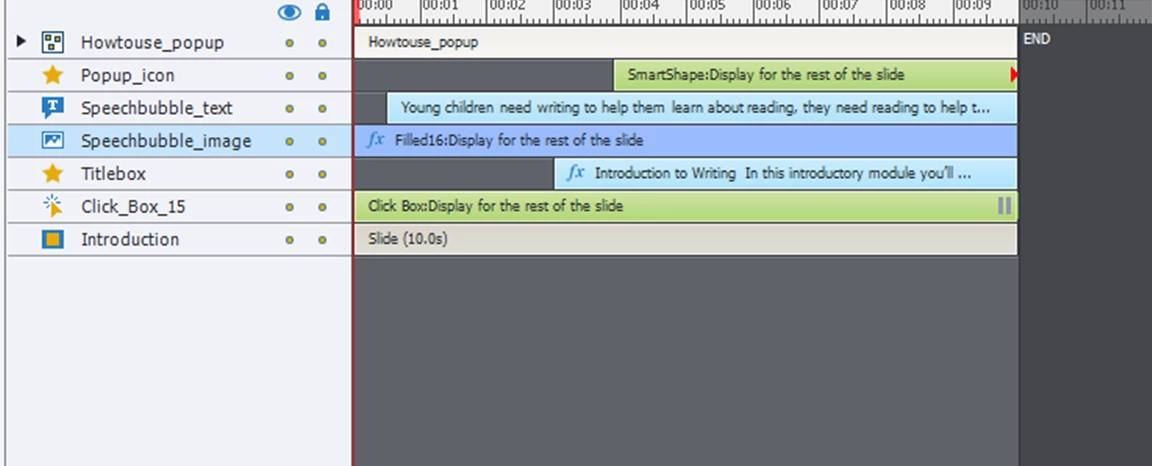
The "popup_icon" button has a simple "Show" action attached to it, to show the lightbox group "Howtouse_popup". (I should note that I've previously had a pause attached to this button as well, but it didn't seem to make any difference to the issue)
Once the lightbox group appears, one of the objects within the group is set as a button, with the simple action "Hide" "Howtouse_popup". It's at this point when the slide decides to auto advance, in spite of the click box with its pause. I'm wondering if the fact that I'm using a group is related somehow, but I've been struggling with it for a while now with no lightbulb moment.
I am sure this is going to be something obvious to the seasoned Captivate professionals out there, so please excuse my ignorance! Pauses on buttons are something I continue to struggle to get my head around and not my favourite feature of Captivate.
Any help much appreciated.
 AdChoices