


Inspiring
February 5, 2022
Answered

Problem with video demo not recording within the red rectangle

  • February 5, 2022
  • 1 reply
  • 413 views

I am using Captivate version 7 on Windows 10 and trying to record a video demo. Captivate does not record the area within the red rectangle. My monitor is high resolution and I think this has to do with the monitor resolution. I searched the web and there are instructions to change the DPIAwareness in the AdobeCaptivat.ini file. I do not see that setting. Below is what my AdobeCaptivate.ini file looks like. I hope that someone can tell me how to fix this problem.


AdobeCaptivate.ini file looks like this:


VistaWin7StartupMessage = 1
LowDiskSpaceMessage = 1
NeedJQueryUI = 0
SystemAudioDriver =Soundflower (2ch)
EquationEditorPathWin =\MathMagic for Captivate\MathMagic for Captivate.exe
EquationEditorPathMac =/Applications/MathMagic for Captivate.app
UserPathForLayoutsAndInteractions = ""
[TRUE STRINGS]
USE_INTELLIGENCE = 1
STRINGS = True;Correct;Right;Yes;T;Y;Wahr;Verdadero;Vrai;Vero;○;참;Verdadeiro

    This topic has been closed for replies.
    Correct answer RodWard

    If you are using two monitors, then they both need to be on the same resolution.


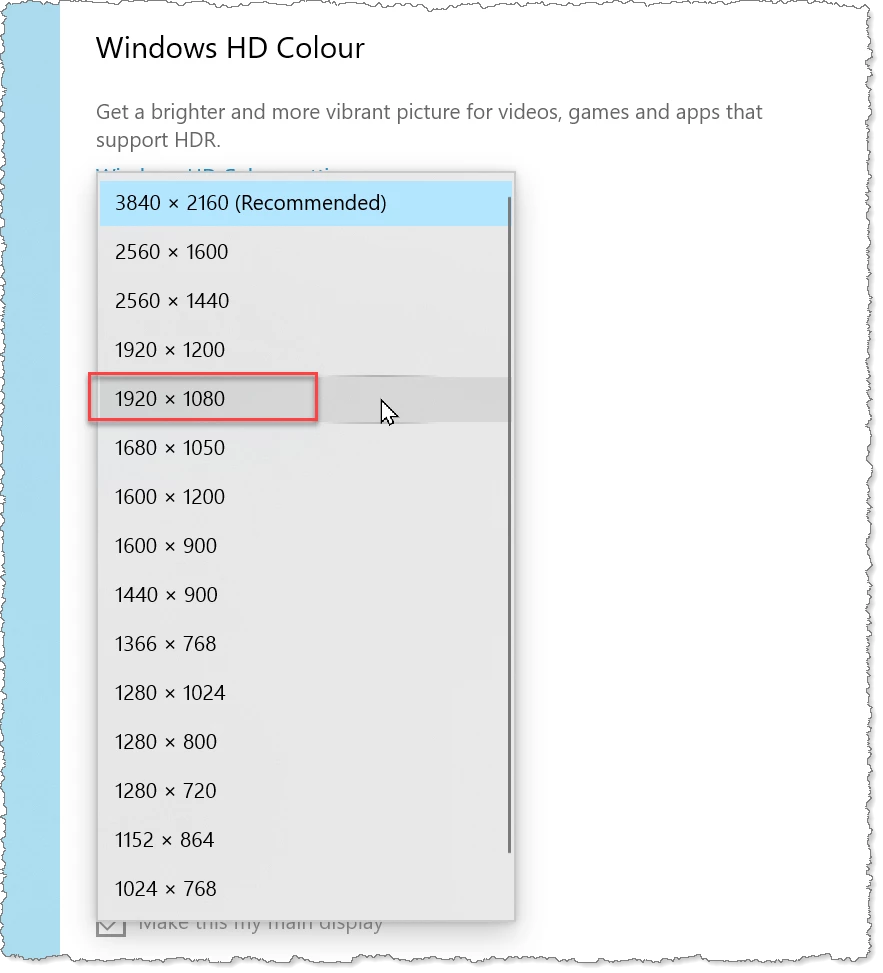
    If you suspect that the monitor resolution is preventing the Video Capture, change your Windows Display settings to reduce the resolution to something like Full HD 1920 x 1080 and see if that makes any difference.

    If that change then allows you to do Video Demo then fine.


    However, I would also offer no guarantee that with a Captivate version as old as version 7 you could really expect everything to work.  That version is now rather ancient.  If the display resolution changes have no effect, you may simply be encountering the limits of what your old Captivate version can offer on a Windows 10 system.

    1 reply

    RodWard
    Community Expert
    RodWardCommunity ExpertCorrect answer
    Community Expert
    February 5, 2022

    If you are using two monitors, then they both need to be on the same resolution.


    If you suspect that the monitor resolution is preventing the Video Capture, change your Windows Display settings to reduce the resolution to something like Full HD 1920 x 1080 and see if that makes any difference.

    If that change then allows you to do Video Demo then fine.


    However, I would also offer no guarantee that with a Captivate version as old as version 7 you could really expect everything to work.  That version is now rather ancient.  If the display resolution changes have no effect, you may simply be encountering the limits of what your old Captivate version can offer on a Windows 10 system.

    Inspiring
    February 5, 2022

    Thanks, Rod. Your suggestion worked.