pablop1976
Participant
October 30, 2017
Answered

Problemas con Captivate 2017

  • October 30, 2017
  • 1 reply
  • 500 views

Hola,

Estoy teniendo problemas con Captivate 2017.

He descargado el archivo Captivate_2017_x64_LS21_192.zip, lo he descomprimido e instalado en mi equipo sin que se produzca ningún problema durante la
instalación.

La primera vez que accedo, la aplicación se abre bien, y me deja hacer una grabación de captura de pantalla, pero en lugar de grabar el área que yo le he indicado, solo graba una pequeña parte, y no he conseguido que grabe bien ninguna vez.

Cuando salgo del programa y vuelvo a entrar, ya no funciona... da un error y sale este mensaje:

Adobe Captivate has stopped working

A problem caused the program to stop working correctly.

Windows will close the program and notify you if a solution is available.


La única manera de que vuelva a funcionar es ejecutar otra vez la instalación y, una vez instalado puedo usarlo, pero solo una vez... y sigue haciendo mal la captura de pantalla.

Tengo un equipo portátil con 8Gb de RAM, con una gráfica que acepta hasta 1920x1080, con espacio suficiente en el disco duro, un procesador Intel Core i5 vPro y un SO Windows 10 Enterprise 64bit… por lo que creo que cumplen con los requisitos mínimos del sistema.

Por favor, ¿me podéis dar soporte para averiguar qué está fallando?

Muchas gracias!
    This topic has been closed for replies.
    Correct answer Lilybiri

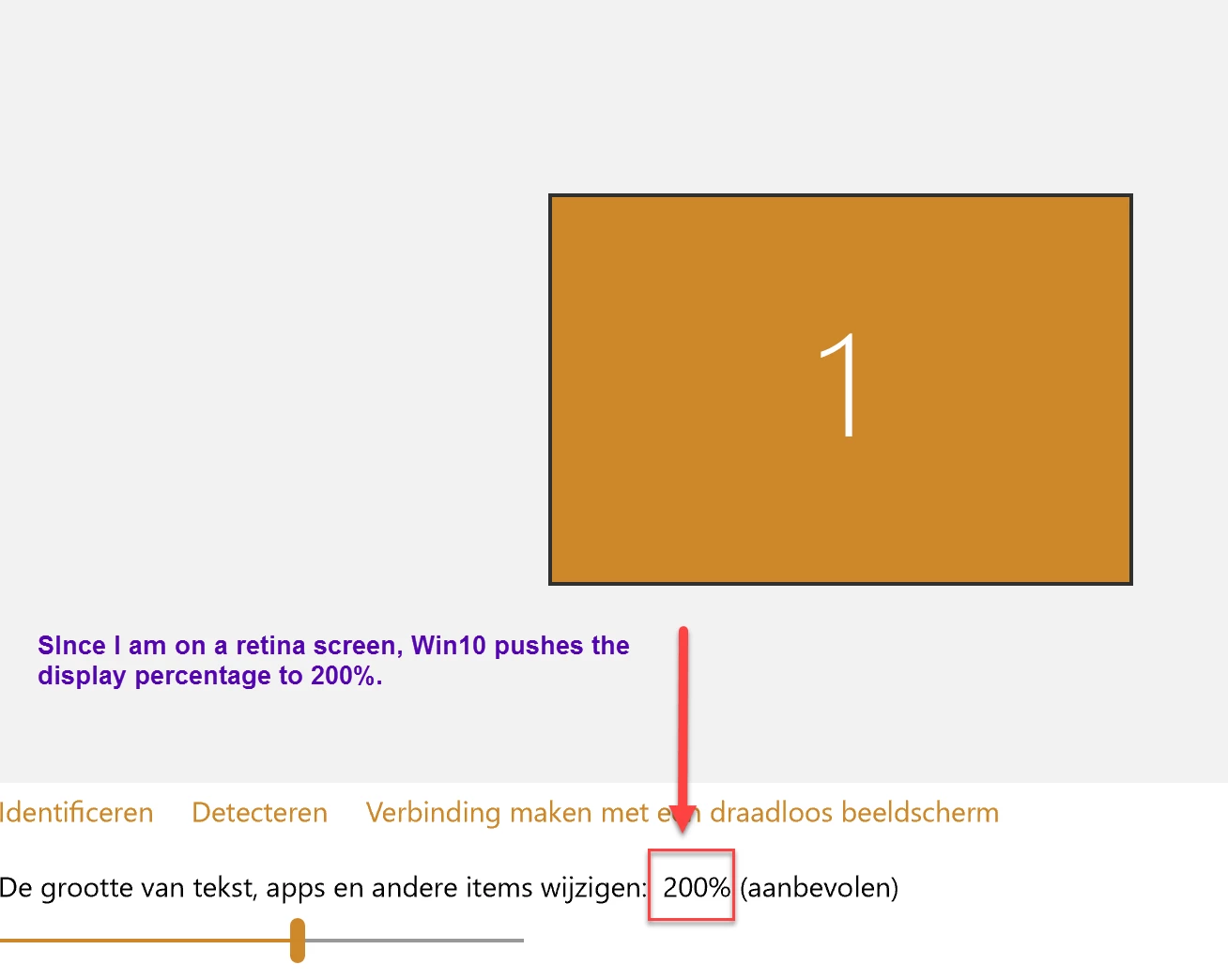
    I know, translation is not very accurate. I was NOT talking about changing the total resolution of the screen at all, but about the Display setting. Maybe this screenshot will help. Sorry my OS is set up in Dutch. This was taken on a Surface Pro, which has a small screen but with retina resolution. Win10 has set the display percentage to 200% to make text readable. Your percentage will probably be 125%. It is normal that you want to capture at the 100% resolution, I don't see this as a bug from Captivate since all screens can have a different display %.

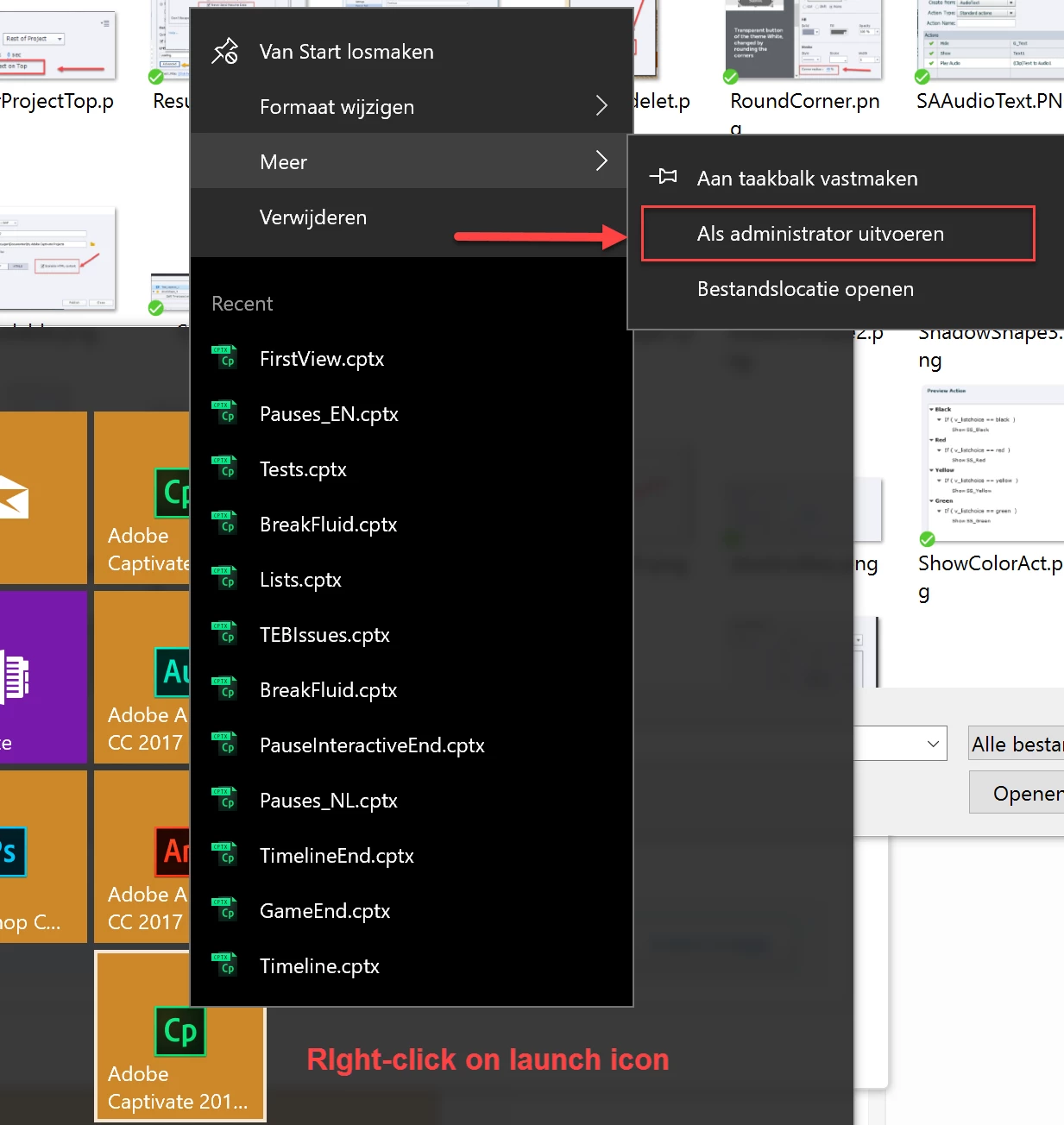
    Did you set Captivate to Run as Administrator, please? Right-click on the launch icon, choose More, Run as Administrator

    1 reply

    Lilybiri
    Legend
    October 30, 2017

    I will try to answer some of your questions.

    You need to run Captivate as Administrator, especially when you want to create software simutations.

    Check the Display Percentage, please. Win10 tends to set it at a value > 100% and you need to set it back to 100% before recording a simulation. That could explain your problem with the captured region.

    Also check if the paths for 'Publish at' and 'Project cache', in Preferences, are pointing to folders on your system. You should never use an extended drive or a networked drive for those folders. Captivate needs to be installed on your system as well, not on another drive.

    pablop1976
    Participant
    October 30, 2017

    Hola,

    Gracias por la respuesta, me ha sido útil en uno de los dos problemas.

    Si pongo una configuración de pantalla en mi equipo de 1024x768 y luego, antes de hacer la captura de pantalla, cambio la captura a 1280x720 (por encima de mi configuración) y luego cambio la captura a otra resolución más pequeña, me graba bien... me parece un poco ridículo y molesto tener que estar cambiando configuraciones... espero que sea algo que solucionen en próximas versiones.

    El otro problema no se soluciona, he verificado que la instalación y todas las carpetas que utilizo están en el disco duro local, así que sigo sin poder usar la herramienta más de una vez... también tengo la opción de instalarla cada vez que quiera usarla... pero para ser una herramienta de pago, me lo está poniendo muy difícil!!!!

    Un saludo.

    Lilybiri
    LilybiriCorrect answer
    Legend
    October 30, 2017

    I know, translation is not very accurate. I was NOT talking about changing the total resolution of the screen at all, but about the Display setting. Maybe this screenshot will help. Sorry my OS is set up in Dutch. This was taken on a Surface Pro, which has a small screen but with retina resolution. Win10 has set the display percentage to 200% to make text readable. Your percentage will probably be 125%. It is normal that you want to capture at the 100% resolution, I don't see this as a bug from Captivate since all screens can have a different display %.

    Did you set Captivate to Run as Administrator, please? Right-click on the launch icon, choose More, Run as Administrator