
Known Participant
January 12, 2017
Question

Problems with IE9 and C9 closing entire browser

  • January 12, 2017
  • 3 replies
  • 1227 views

I am hoping that someone has the answer to this question/problem.

Our university uses SABA (we are on Release 35) as our LMS. We use C9 (version 9.0.0.223) to create web-based courses. The course was designed using a Responsive Project template and published using SCORM 1.2 or SCORM 2004. It was marked to "enable reporting for this project" and set succession to be 100% slide views. The course was then uploaded into SABA as a SCORM package.

Users who are launching the course using IE9 (and IE10 and 11 as well) are having issues. When users close the course, using the exit button created in the Captivate course, the entire browser is closed. This leads to the course not marking as being successfully completed. This occurs when users are using an "exit" button built in the actual Captivate course.
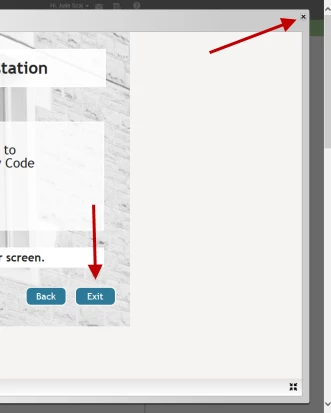
The other scenario that happens is when users close the course using the "x"  in the LMS system window. For some users, the course shows as being completed successfully in the LMS, but when users try to run a report to verify all of their course completions in the LMS, it shows that they are "in progress" instead of successful.

None of this happens when using either Firefox or Chrome. Can anyone help explain these behaviors and what we might do to put a solution into place?

Thnaks for your time and expertise!

This topic has been closed for replies.

3 replies

TLCMediaDesign
Inspiring
January 13, 2017

You can try putting an alert in the script to see if the alert happens before the error is generated. I don't have time to test the "responsive" exit, I would imagine it's the same for a normal html5 project.

Attached to the clickbox you are just choosing "Exit" from the Actions drop down?

Generally that error is generated when to SCO tries to communicate after the "Terminate" method is called.

alert("SCRIPT CALLED");

Inspiring
January 13, 2017

"Attached to the clickbox you are just choosing "Exit" from the Actions drop down?"
That is correct. Is there a better, safer way? Advanced action?

TLCMediaDesign
Inspiring
January 13, 2017

Sorry, I had a couple of variables in the script that stop the SCORM calls from being execute during local testing. Try the script below as I have included the definition of the variables and also added the alert.

window.addEventListener( 'moduleReadyEvent', function( e )
{

//override Captivates exit function, fix for IE closing browser
window.DoCPExit = function()
{
 
  alert("Overwrite function")
  //test if running http
  var netConnected = window.location.protocol.indexOf('http');
  //test if running http on localhost
  var localHost = location.href.indexOf('localhost');

  if (netConnected != -1 && localHost == -1) //only execute if running on the server
  {

   SCORM2004_CallSetValue('adl.nav.request', 'suspendAll');
   SCORM2004_CallSetValue('cmi.exit', 'suspend');
   var result = SCORM2004_CallTerminate();

   if ( result )
   {
    document.location.href = 'goodbye.html';
   }
  }
  else
  {
   var win = window.open('', '_top', '', 'true');
   win.opener = true;
   win.close();
  }
}
});

TLCMediaDesign
Inspiring
January 12, 2017

I've solved this by overwriting CP's exit function. This script is for SCORM 2004 and should be placed in the head section of the index_SCORM.html file

window.addEventListener( 'moduleReadyEvent', function ( e )

{

   //override Captivates exit function, fix for IE closing browser

window.DoCPExit = function()

{

  if ( netConnected != -1 && localHost == -1 )//only execute if running on the server

  {

   SCORM2004_CallSetValue( 'adl.nav.request', 'suspendAll' );

   SCORM2004_CallSetValue( 'cmi.exit', 'suspend' );

   var result = SCORM2004_CallTerminate();


   if ( result )

   {

    document.location.href = 'goodbye.html';

   }

  }

  else

  {

   var win = window.open( '', '_top', '', 'true' );

         win.opener = true;

         win.close();

  }

}

});

Inspiring
January 13, 2017

Hello, Lilibiri pointed me here as we might have a similar issue but with other browsers where we come up with a "fatal error, communication with server lost" message after clicking "exit".

Where exactly do we put in the script?
After "script"? Also can we adapt from "ie" it so it always overrides the function regardless of browser? Thanks so much for your great work!

<!DOCTYPE html>

<html lang="en">

<head>

<meta name='viewport' content='initial-scale = 1, minimum-scale = 1, maximum-scale = 1'/>

<meta http-equiv="Content-Type" content="text/html; charset=utf-8" />

<meta http-equiv="x-ua-compatible" content="IE=10">

<title>Module 3</title>

<style type="text/css">#initialLoading{background:url(assets/htmlimages/loader.gif) no-repeat center center;background-color:#ffffff;position:absolute;margin:auto;top:0;left:0;right:0;bottom :0;z-index:10010;}</style>

<script>

var deviceReady = false;

var initCalled = false ;

var initialized = false;

TLCMediaDesign
Inspiring
January 13, 2017

Yes, put it right after the <script> tag. You can put it in the template file also so it's always there.

The script doesn't actually target IE, but that is usually the browser the closes completely instead of closing the SCO.

Lilybiri
Legend
January 12, 2017

First of all, please update to 9.0.2.437, you missed 3 patches.

As for the issue you are having, that is the big problem with HTML output. IE is certainly not the best browser to support HTML, certainly not IE9. Its developing is now discontinued, replaced by Edge browser.  Maybe a scripting expert pops in to explain how you can try to push IE at behaving the proper wayn cannot help you, sorry. Maybe the update could help, but I'm not sure at all.