
April 2, 2016
Answered

Producing a file as executable.

  • April 2, 2016
  • 2 replies
  • 415 views

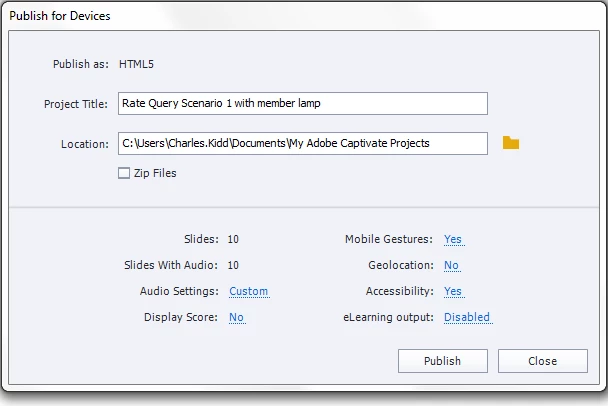
I have a file that I would like to publish as executable.  When I click on publish, there is usually a drop down menu that I could select executable from.  In this instance, there is no drop down menu and the file appears to be defaulted to HTML5.  How can I publish as an executable file?  Thanks for your help.  This is the image that comes up and I'm use to seeing the drop down menu next to Publish as:
    This topic has been closed for replies.
    Correct answer RodWard

    EXE or SWF are not an available outputs for a Responsive Project. Only HTML

    2 replies

    April 3, 2016

    Thank you Rod - I cannot find the icon to answer correct.  As always, you are correct, we did the recording the wrong way for what we wanted to do on the back end.  Oops.

    Thanks for your help and I appreciate it.  How do I give you the "correct points"?

    Charles

    RodWard
    Community Expert
    Community Expert
    April 3, 2016

    It looks to me like you already have nominated my answer as the correct one.  So don't worry about it.

    RodWard
    Community Expert
    RodWardCommunity ExpertCorrect answer
    Community Expert
    April 2, 2016

    EXE or SWF are not an available outputs for a Responsive Project. Only HTML

    April 2, 2016

    Hi Rod - I had four other responsive project files I created and when I clicked on produce there was the option to produce in executable file.  I may have done something different but I recorded them the same way.  How could I take this and produce in a way that could be sent for people to view outside of the learning management system?

    Lilybiri
    Legend
    April 2, 2016

    That is not possible, Charles. Responsive projects are HTML output only, and publishing to exe means that you need SWF output. Same for output to pdf. You can publish the output folder to a webserver and send the link, for those that have no access to the LMS.