
December 21, 2016
Question

Programming a Navigation Button

  • December 21, 2016
  • 2 replies
  • 457 views

I've got a smart shape set up as a button to move forward in the presentation..

When the viewer of this presentation presses the forward button and reaches slide 9, I would like another smartshape to appear.  This other smart shape has a one paragraph message.

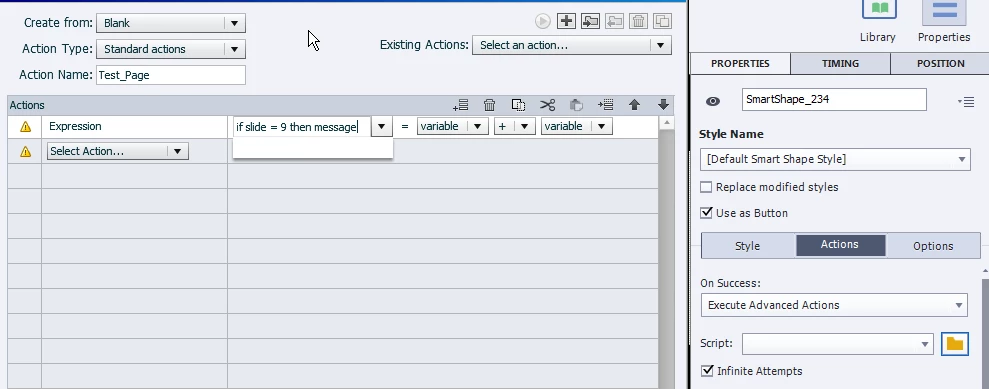
I'm getting stuck on the programming statement I need to get this done. (see graphic)
    This topic has been closed for replies.

    2 replies

    christophet11731756
    Inspiring
    December 21, 2016

    Hi Berlin, 

    If I understand your problem, you wish change the smart shape you have on during slide 1 to 8 who is use like a button to go to next slide. 

    Then you wish change this first smart shape by a new one ?

    Exactly ?

    In this case I could help you. 


    Best regard Berlin,


    Chris from France. 

    Christophe Tillier- Enovatech France https://www.linkedin.com/in/christophe-tillier-24bba489/
    Lilybiri
    Legend
    December 21, 2016

    No, that is not the problem.  That one button should have a different command on the last slide (slide 9), in this case showing a shape used as a text container, whereas on the other slides it has the functionality of a Next button. I posted screenshots of the needed conditional advanced action which he has to reproduce.

    In his first thread I offered an alternative, but he choose to go with the conditional action.

    December 23, 2016

    Hi Christopher and Lily:

    As I move forward in the presentation I will reach slide 9.  Slide 9 is NOT the last slide.  This was someone else's post in the adobe forum which wasn't applicable to my situation.

    When slide 9 is reached I want a smart shape to appear with a message about departmental contacts and phone extensions. . 

    Lilybiri
    Legend
    December 21, 2016

    You want to do what I explained in the other thread? Which scenario do you want me to show step by step: by hiding the first button and showing the next button? Or the conditional action for the same button?

    Lilybiri
    Legend
    December 21, 2016

    I see that you were looking for IF, so you want the conditional action, it wpuld look like this:

    And the Else part: