Participant
July 17, 2013
Question

Project Expiry Date - Greyed Out

  • July 17, 2013
  • 2 replies
  • 587 views

Afternoon

I had our IT guys installed a licensed version of Captivate 6 on my PC today, prior to this I had been using the trial version (which had expired)

I can't export any projects completed with the trial version, I can't even export a brand new project using the licensed version.
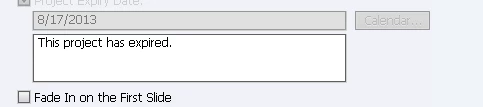
I've tried renaming the Captivate folder from Application Data, no luck..

Looking forward to a resolution.

Cheers


NB

    This topic has been closed for replies.

    2 replies

    Participant
    October 22, 2015

    Hi there.

    I have a same problem with you.

    I've also tried renaming the folder but so far no luck.


    Is there any way to solve this?

    Version:6.0.1.240


    Thanks.

    RodWard
    Community Expert
    Community Expert
    October 22, 2015

    If you're NOT using a Trial version of Captivate, then reset your Preferences folder.

    Participant
    October 23, 2015

    Thank you for your reply!

    I am using product version.

    I renamed the following folder but my problem has not been fixed.

    C:\Users\[USERNAME]\AppData\Local\Adobe\Captivate 6.0  on Windows7

    Where else should I check ?

    Best regards.

    Varun Kalra
    Participating Frequently
    July 19, 2013

    Hi there,

    Is it Windows XP?

    Did you rename the folder from this location: Windows XP:  C:\Documents and Settings\[current user name]\Local Settings\Application Data\Adobe\Adobe Captivate 6 folder?

    Also, try clearing the cache and then relaunch Captivate.

    Thanks.