
jonathanp9139783
Known Participant
November 17, 2017
Answered

Project Not Continuing on Software Simulation when Using Click Box

  • November 17, 2017
  • 1 reply
  • 134 views

Hi group.

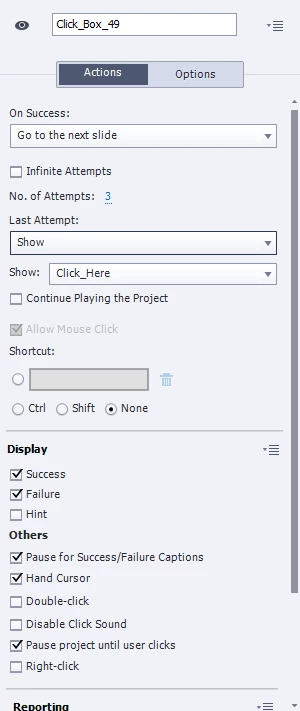
I have a software sim in place, and want the failure box that activates on a misclick to display three times. After the third time, I want a dialogue to display telling the user where to click. I've got all that working, but my issue is when that happens, the user can hover over the click box but the sim wont continue when it's clicked. I've pasted a copy of the properties for the click box that gets added on a click in a software sim. The "Click_Here" object is just the dialogue box that displays after the final failed attempt (if the user does in fact fail that many times). Thanks.
    This topic has been closed for replies.
    Correct answer RodWard

    OK.  The problem here is that you want something to happen for the Click Box's ON Last Attempt event (Show the Click Here caption), and then you want something else to happen AFTER that if the user clicks the same Click Box.  You don't really have any more usable events left to trigger any actions.

    If you don't like just giving the user some seconds AFTER the box appears to click the correct spot before the slide moves on, then another suggestion would be that you have TWO Click Boxes set up in the same spot.  Have only one shown and enabled at a time, while the other one is hidden and disabled (so that it cannot register clicks). Use the On Last Attempt action of the first Click Box to execute an Advanced Action that not only SHOWS the Click Here box that points to the right spot, but also then Hides and Disables the first Click Box, while at the same time (or a split second afterward) SHOWS and ENABLES the second Click Box.

    That then gives you another Success event you can use to trigger the jump to the next slide.

    1 reply

    RodWard
    Community Expert
    Community Expert
    November 17, 2017

    Try checking the box that says Continue Playing the Project.

    jonathanp9139783
    Known Participant
    November 17, 2017

    I did that and it actually continued the project on to the next slide without the user being able to click the box I want them to click. I want them to still be able to click where they need to to continue the sim once the dialogue displays.

    RodWard
    Community Expert
    RodWardCommunity ExpertCorrect answer
    Community Expert
    November 17, 2017

    OK.  The problem here is that you want something to happen for the Click Box's ON Last Attempt event (Show the Click Here caption), and then you want something else to happen AFTER that if the user clicks the same Click Box.  You don't really have any more usable events left to trigger any actions.

    If you don't like just giving the user some seconds AFTER the box appears to click the correct spot before the slide moves on, then another suggestion would be that you have TWO Click Boxes set up in the same spot.  Have only one shown and enabled at a time, while the other one is hidden and disabled (so that it cannot register clicks). Use the On Last Attempt action of the first Click Box to execute an Advanced Action that not only SHOWS the Click Here box that points to the right spot, but also then Hides and Disables the first Click Box, while at the same time (or a split second afterward) SHOWS and ENABLES the second Click Box.

    That then gives you another Success event you can use to trigger the jump to the next slide.