Participating Frequently
December 22, 2015
Question

Project not displaying in Preview

  • December 22, 2015
  • 2 replies
  • 295 views

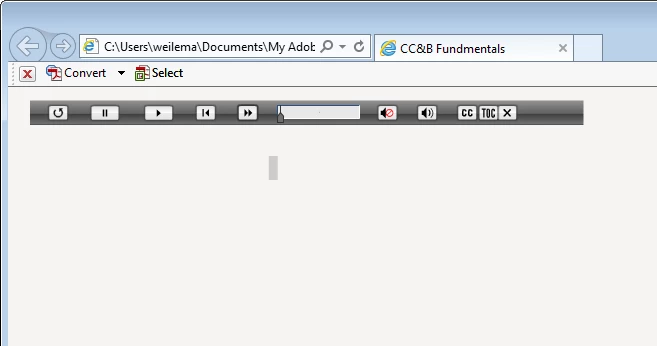
I periodically get a strange view when previewing my projects or publishing them. It usually clears up when I close the browser and preview or publish again. However, I would like to know what is causing this to happen. See image below:
    This topic has been closed for replies.

    2 replies

    Lilybiri
    Legend
    December 24, 2015

    Is this a screenshot after publishing, or during preview? If it is the last: which preview did you use? Which browser? Did you try another browser?

    MarWlrAuthor
    Participating Frequently
    December 29, 2015

    This happens both after publishing as well as during preview. It happens in any mode of preview that I use. I am using my company computer, since this is for work, and the default browser is Internet Explorer. I also have Google Chrome, but I'm not sure how to set the preview to display in another browser.

    Lilybiri
    Legend
    December 29, 2015

    You'll have to indicate that Chrome is now the default browser, and the preview will play in Chrome.  It really is worthwhile to try another browser.

    RodWard
    Community Expert
    Community Expert
    December 24, 2015

    What version of Captivate?

    What type of output?

    Have you tried changing the skin to something else?

    MarWlrAuthor
    Participating Frequently
    December 29, 2015

    This happens with Captivate 8 and 9 when I preview in any mode and when I publish as HTML5/SWF. I haven't tried changing the skin. The problem is that it doesn't happen all the time. When it does happen, it usually clears up when I close the preview and preview it again or, in the case of publishing, I republish.