March 15, 2012
Question

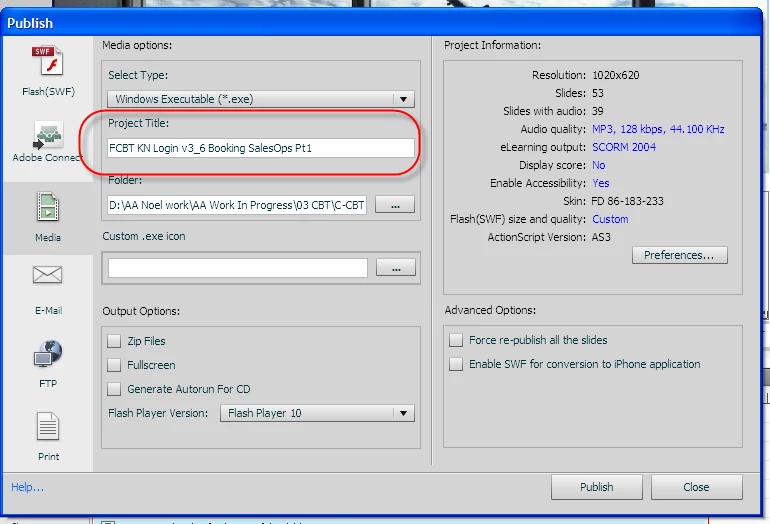
Project Title in Publish not as per project's saved name
  • March 15, 2012
  • 1 reply
  • 558 views

I created a project with a name but when I came to publish it - the name in the project title box (above) was not the name of the project I was about to publish.

Any ideas either where the Project Title in Publish comes from ? Or what is required to ensure the details displated in Publish are the same as the project itself ?

Noel

    This topic has been closed for replies.

    1 reply

    RodWard
    Community Expert
    Community Expert
    March 15, 2012

    It's usually just the project file name at first and you have to change it to what you want.  From then on it should stay what you set it to.

    Did you upgrade this project from an earlier version of Cp?

    March 15, 2012

    Hi Rod,

    Yes I did in fact upgrade this from v4 to v5.5

    RodWard
    Community Expert
    Community Expert
    March 15, 2012

    OK.  Then it makes sense.  I have seen this issue previously with projects upgraded from version 4.  There are some workarounds for the issue that involve saving the file as another name into a different folder and then changing the Project Title to what you want before then saving it back to the original folder and filename.  However, unless you have a lot of Advanced Actions set up in this project, I would also suggest just starting a new blank Cp 5.5 file at the same dimensions and then copy/paste all the slides into the new shell.  It might get you a more stable result.