Answered
Properties Quality?
Good morning,
Can anyone give me a quick overview of the Properties Quality for Adobe Captivate 8?
Is there a way to change the quality for all of the slides at one time within properties?
Thanks

Good morning,
Can anyone give me a quick overview of the Properties Quality for Adobe Captivate 8?
Is there a way to change the quality for all of the slides at one time within properties?
Thanks
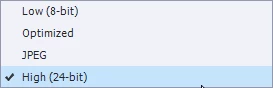
Default quality is Optimized, which will do mostly fine. Sometimes the quality High will lead to a slightly smaller file size (which I find weird). You should not use Low (8-bit, which means only 256 colors), unless you need very small file sizes. I never used JPEG for slide quality.
If you want to change quality for all slides, use CTRL-A within the Filmstrip to select all slides and change the quality.
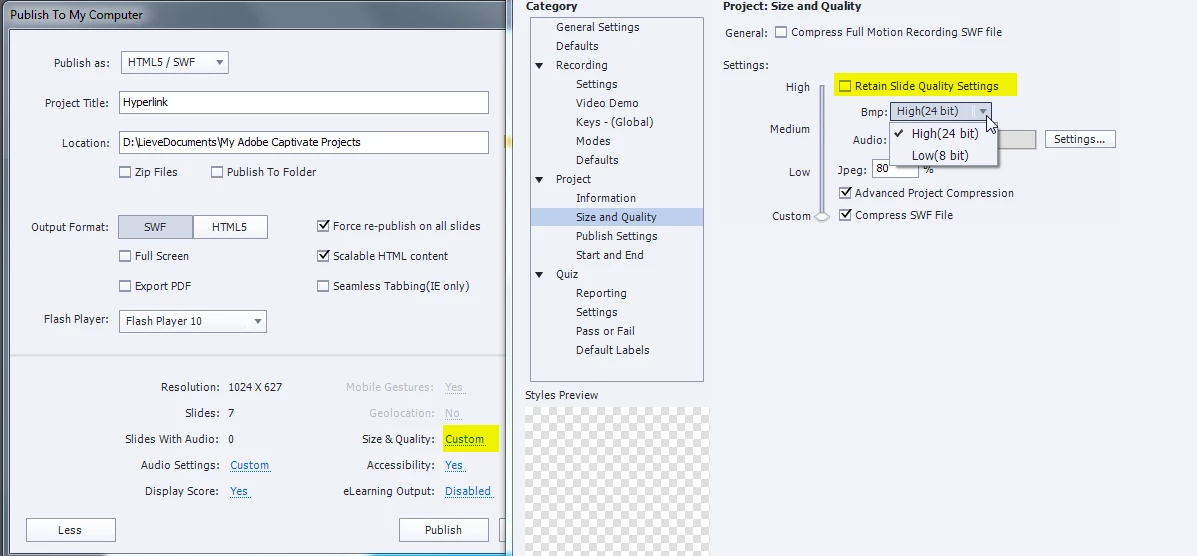
You have still the opportunity to override the chosen quality when publishing. You can do it directly from the Publish dialog box, open the More button and click on the present Slide Quality. You'll end up in the Preferences, Project, Size & Quality, where you can uncheck the option 'Retain Slide Quality' and choose another quality, but you have only the choice between High and Low:
Already have an account? Login
Enter your E-mail address. We'll send you an e-mail with instructions to reset your password.
 AdChoices