
Inspiring
November 2, 2015
Answered

Publish a project with an expiry date

  • November 2, 2015
  • 1 reply
  • 530 views

Hi,

We have some clients in the Middle East who have very restricted access to the internet so are not going to be able to use our Captivate courses which are hosted on LearnUpon.com. We want to give our clients a local copy of the published files to use, but we want to restrict access to a certain period of time, the same as any client who purchases through LearnUpon.

I know that when I used the trial version of Captivate my published projects expired along with the trial version of the software. Is there any way I can publish to PDF format (for example) and specify an expiry date myself?

Cheers,

Kevin
    This topic has been closed for replies.
    Correct answer Captiv8r

    Hi there

    I'm not sure about the PDF, but it should probably work.

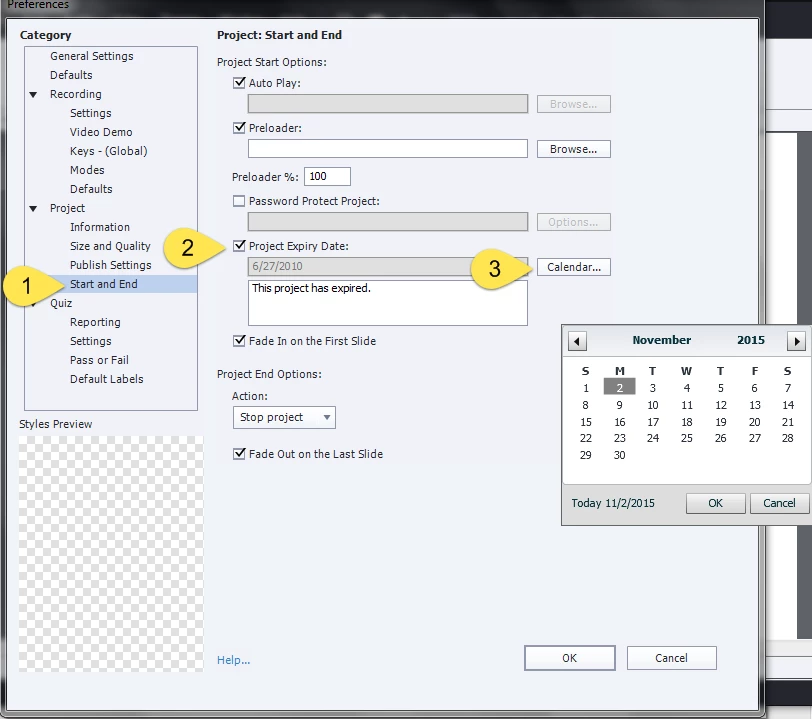
    Try clicking Edit > Preferences > Project > Start and End

    Note that this isn't truly secure. If the end viewer simply changes the date on the computer so it falls within specs, they could still use the output.

    Cheers... Rick

    1 reply

    Captiv8r
    Captiv8rCorrect answer
    Legend
    November 2, 2015

    Hi there

    I'm not sure about the PDF, but it should probably work.

    Try clicking Edit > Preferences > Project > Start and End

    Note that this isn't truly secure. If the end viewer simply changes the date on the computer so it falls within specs, they could still use the output.

    Cheers... Rick

    Inspiring
    November 2, 2015

    Thanks Rick - I originally looked in this panel and completely missed this option! Thanks also for the info on the date/time settings of the machine.

    Cheers,

    Kevin