Participant
September 6, 2011
Answered

Publish error with Captivate 5

  • September 6, 2011
  • 2 replies
  • 1057 views

I cannot get a project to publish in Captivate 5. I keep getting an error message saying the project failed to publish and then when I try again it asks if I want to overwrite the file. A file was actually created but it is totally blank. I am working on a Windows 7 machine. I had no problems with Captivate 4.
    This topic has been closed for replies.
    Correct answer RodWard

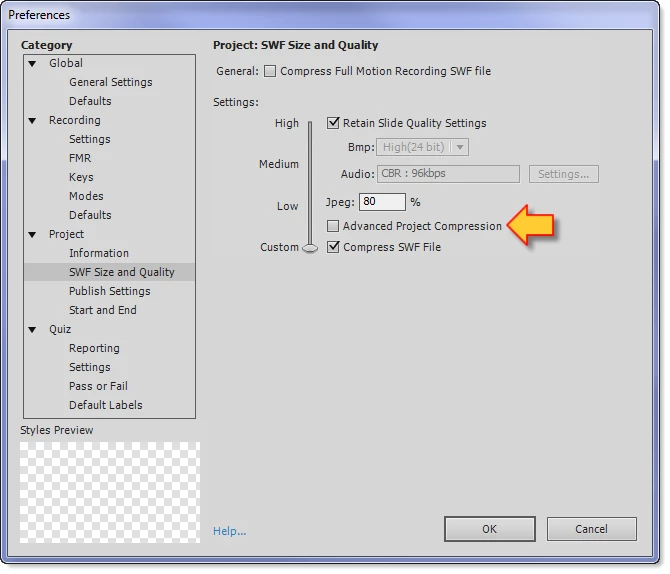
    He means these ones:

    2 replies

    RodWard
    Community Expert
    Community Expert
    September 7, 2011

    This might be a permissions issue.  Where is the folder that you are trying to publish out to?  Is it on your PC or on a network somewhere?  To test, try publishing to a folder inside your My Documents folder where you should have full write permissions.

    ccshermaAuthor
    Participant
    September 7, 2011

    This is not a permissions issue. I have full rights and I have tried publishing to My Documents.

    Captiv8r
    Legend
    September 6, 2011

    Welcome to our community

    Have you tried clicking Edit > Preferences and turning off all compression options?

    Cheers... Rick

    Helpful and Handy Links

    Captivate Wish Form/Bug Reporting Form

    Adobe Certified Captivate Training

    SorcerStone Blog

    Captivate eBooks

    ccshermaAuthor
    Participant
    September 7, 2011

    Rick, I am not sure what settings you are referring to. Nothing looks like a compression setting.

    RodWard
    Community Expert
    RodWardCommunity ExpertCorrect answer
    Community Expert
    September 7, 2011

    He means these ones: