


Participant
August 17, 2022
Question

PUBLISH FAILED

  • August 17, 2022
  • 2 replies
  • 133 views

Hi everyone,


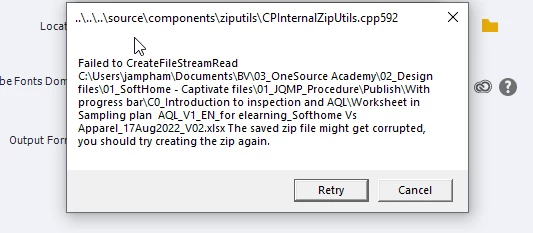
I'm getting this error message while trying to publish a Captivate project (see the below screenshot). Do you have any idea about the cause of this issue? I guess it's due to a file attached to a button. I sometimes run into trouble with the OPEN URL action when Captivate cannot open a file from my computer. However, I can still publish the file in those cases, unlike this time.


    This topic has been closed for replies.

    2 replies

    RodWard
    Community Expert
    Community Expert
    August 17, 2022

    The issue seems to be due to the ZIP utility choking on the Excel document during the publish procedure.

    Try changing the name of your Excel document to a simpler name, all lower case, with no spaces.  Then set up the Open URL or File action again to point to the renamed file.  Try republishing after that again but without checking the ZIP option first.  If, the republish is successful, try again with ZIP selected in the Publish dialog.


    Another possibility is that your file folder structure is too many levels deep.  Try pulling the Captivate CPTX and the linked Excel file up to a higher level in the C drive, reset the Open URL or File action for that new location, and try republishing again.

    Lilybiri
    Legend
    August 17, 2022

    Honestly, I have never seen such an error message so far.

    It seems to be related with zipping. Are you publishing a SCO or if that is not the case, did you check the 'zip'  feature in the Publishing dialog box? It is also a very long path, and complicated names.

    Are you also sure that the documents folder is on your system, not pointing to a networked drive?