Participant
June 25, 2010
Question

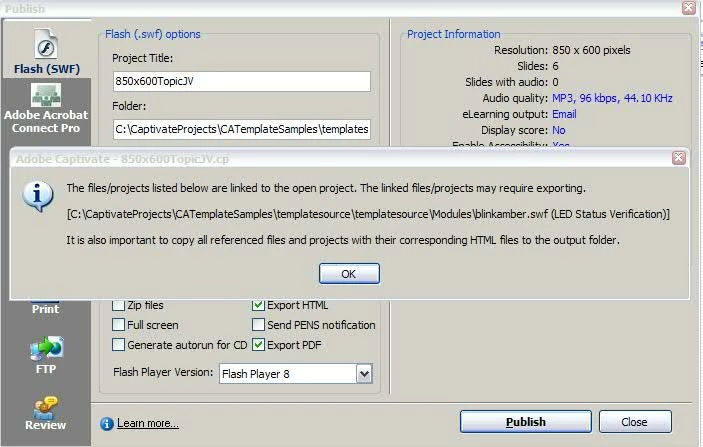
Publish project to PDF with imbedded link to SWF file

  • June 25, 2010
  • 1 reply
  • 555 views

I am an inexperienced user of Captivate CS4. I am attempting to publish a project to a PDF and I get a message that the linked file may require exporting. I have not found anything explaining how this should be done. Apparently, the export is required because when I open the PDF and click the link, the (SWF) file does not open. I appreciate any assistance or direction you can provide.
    This topic has been closed for replies.

    1 reply

    Lilybiri
    Legend
    June 25, 2010

    Hello,

    When you export to PDF, you'll get a multimedia PDF document that can be viewed with Adobe Reader 9. It seems that in the to be published CP4-files you do have links to other files, are those also CP-files? If so, could you export them to PDF-files as well? When posting them somewhere they have to be all in the same folder, and here I'm not absolutely sure if the links will continue to work from the first PDF to the other PDF-documents.

    Do you have Acrobat 9? If the links do not work, it would perhaps be better to export the SWF and insert them in a PDF-doc

    Lilybiri

    cp2jcvAuthor
    Participant
    June 25, 2010

    Thanks for your reply.

    I apologize, I should have provided more detail in my original post.

    I am testing a small Captivate project consisting of 5 slides. One of the slides contains a click box which is to open a SWF file when clicked. When the project is published as an EXE or SWF, the link works properly when clicked. When published as a PDF, the link does not work. The SWF file that I use is in the same folder as the project at the time of publishing. I also placed a copy of the SWF file in the folder that contains the PDF once it is published. I am guessing that some how the SWF file must be exported as the sample message suggests in my original post, but I do not know how this is done and have not found any directions on how to do this. I am using Adobe Acrobat 9 Pro to open the PDF.