March 1, 2012
Answered

Publishing as Handout to Word - Small Image of Slide

  • March 1, 2012
  • 1 reply
  • 928 views

Captivate v5.5

I seem to recall there was a way around this issue in v4 - and I hope someone out there will have the answer for v5.5

When publishing my project to word as a "Handout" the image of the slide is very small (see Fig 1 below).
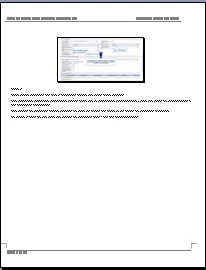
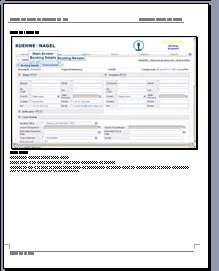
How can I increase the size of the slide image to the size I used to get it in v4 (see Fig 2 below)
Noel

    This topic has been closed for replies.
    Correct answer Lilybiri

    Noel,

    Try by unchecking 'Use Table in the Output'

    Lilybiri

    1 reply

    Lilybiri
    LilybiriCorrect answer
    Legend
    March 1, 2012

    Noel,

    Try by unchecking 'Use Table in the Output'

    Lilybiri

    March 1, 2012

    If I could...I would give you a big kiss!!!!

    Many thanks....So easy when you know how (and who).

    Noel

    Lilybiri
    Legend
    March 1, 2012

    Virtual kiss???