Participant
February 7, 2014
Question

Publishing different than preview

  • February 7, 2014
  • 1 reply
  • 999 views

I am working on a training video series about Moodle.  I have carefully previewed the project to confirm that everything is timed correctly and matches the audio.

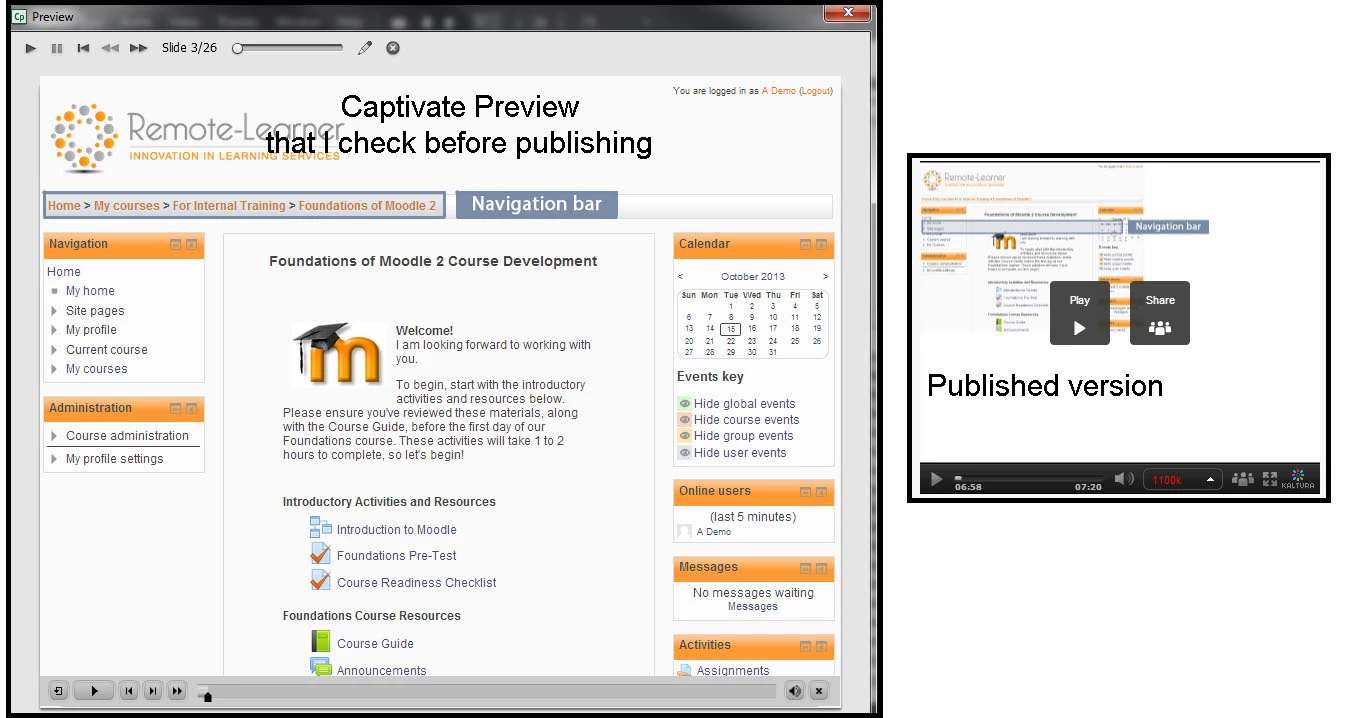
However, the published version displays something much different than the preview.  Errors include:

- 1 slide displays smaller and in the top left corner instead of the full screen area, making all the highlights wrong

- images from one slide are staying around on another slide

- transitions (fade in/fade out) do not look right in the published version

What is going on?
    This topic has been closed for replies.

    1 reply

    Legend
    February 7, 2014

    Your preview mode and publshing mode are not same. What is the format you are publishing the course to?

    Sreekanth

    ABrevardAuthor
    Participant
    February 7, 2014

    I publish these videos in mp4 format.

    I do not understand how the publishing mode would be the issue because I have successfully published over 20 videos using the same mp4 mode. These errors seem like a publishing bug that does not happen all the time.

    Am I missing some kind of setting that will allow the publish to produce the same thing that I see when previewing my work?

    Additional errors found with other recent videos:

    - audio cuts in and out (plays correctly during preview)

    - text does not appear (appears during preview)

    Is there any way this could be a computer issue rather than a Captivate issue?  It seems Captivate related since I am publishing from Captivate...sometimes the videos turn out right, sometimes they have these random errors.  However, Captivate does run slowly on my computer - would that be a cause for publishing problems?

    Thank you for any direction that you can provide.

    sapphiregraphics1
    Known Participant
    February 9, 2014

    For the malfunctioning slides, is the slide "Quality" set to the same setting as the correct slides?

    Is this a file that you converted from PowerPoint?