This topic has been closed for replies.

4 replies

AnotherMeAuthor
Inspiring
February 15, 2017

Hello everyone,

This is a follow up to my question from August of 2016.

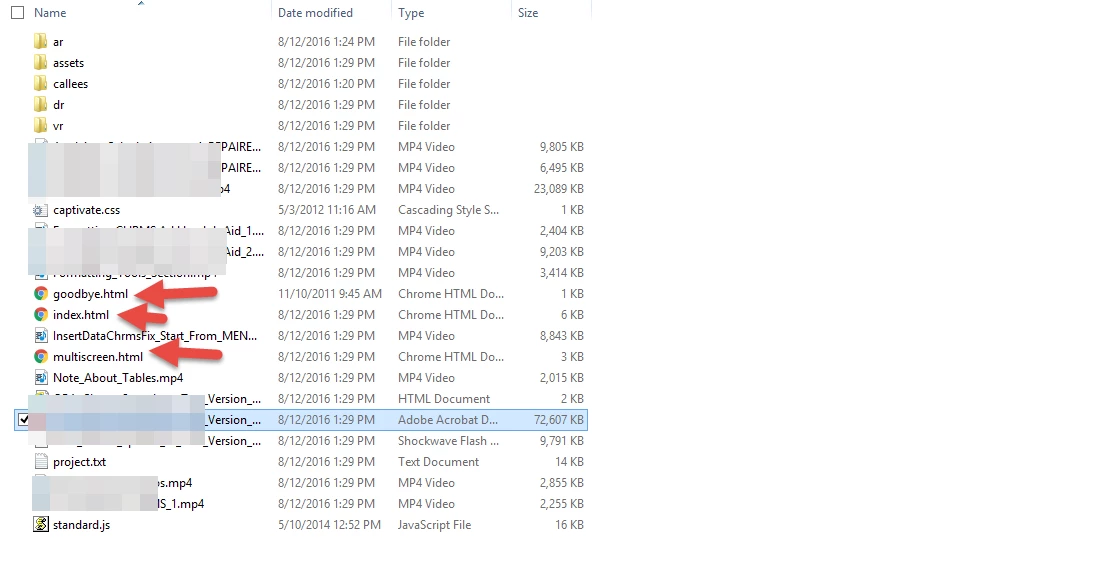
Is there a preference in Adobe Captivate 8 that will stop goodbye.html from publishing?

Thanks

TLCMediaDesign
Inspiring
February 15, 2017

The actual call to the file is at the bottom of the CPM.js in the exit function. You can either edit that every time or you can just try removing the file from the template location and see if it throws an error.

The template location is:

C:\Program Files\Adobe\Adobe Captivate 9 x64\Templates\Publish\LMS\Standard\AICC\RelatedFilesForRusticiDriver\

Inspiring
August 13, 2016

I don't know about the "goodbye.html" file. 

  • The "index.html" file triggers the HTML 5 version of your content
  • The "NAME-OF-YOUR-PROJECT.html" file triggers the Flash version of the content

The "multiscreen.html" file is generated only if you publish your content both in HTML 5 and SWF at the same time.  As stated by @Captiv8r it contains a javascript. The javascript contained in "multiscreen.html" detects if the device used is a mobile device. If it is, it redirects the user to "index.html" (to show the HTML5 version), and if it is not a mobile device, it redirects the user to "NAME-OF-YOUR-PROJECT.html" to show the Flash version.

Lilybiri
Legend
August 13, 2016

Small correction the file to launch the SWF has an extension htm, not html. It calls the JS and the CSS file and then launches the SWF itself.

Captiv8r
Legend
August 12, 2016

I believe the multiscreen.html is used for browser detection. My understanding is that it contains "sniffer" script. If the browser opening it is "HTML5 Capable", it presents the HTML 5 version of the output. If not, it falls back and presents the SWF version of the output.

Cheers... Rick

TLCMediaDesign
Inspiring
August 13, 2016

I believe it's the other way around, swf is primary and hamlet is the fallback. The goodbye.html used for AICC published courses as far as I can tell.

AnotherMeAuthor
Inspiring
August 15, 2016

This is the first I'm reading about "hamlet" and AICC. Can you please elaborate?

Thank you.

MichaelStephens
Legend
August 12, 2016

I don't have version 8 installed anymore, but my guess is the multiscreen.html file is associated with responsive design.

The goodbye.html file is what users see when they click the exit option for a training. It just gives them a message that they can now close the browser safely.