
Peter Nortjè2939446
Known Participant
October 5, 2019
Answered

Publishing HTML5/SWF issues

  • October 5, 2019
  • 1 reply
  • 799 views

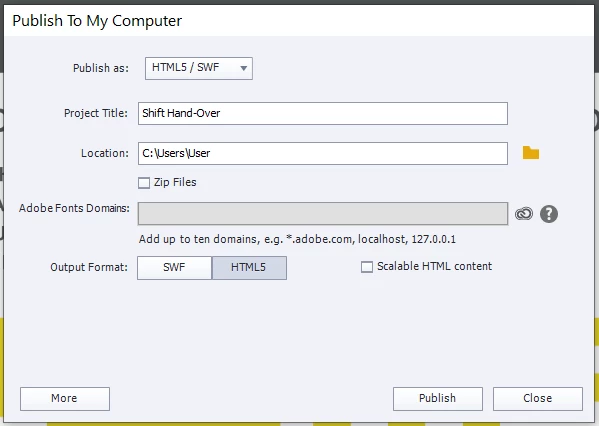
Hi - I have just downloaded version 11.5.1 on a new laptop and wanted to test some of the fucntions. I opted to publish to a folder like this: C:\Users\User with the Title "Shift Hand-over" (it is a work doc)  
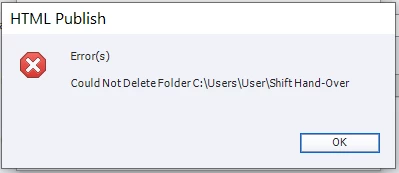
On publishing I get the following message -
 

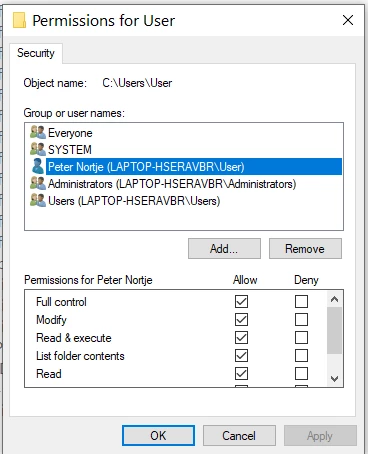
Notes: I am the Administrator , Windows 10 pre-installed on the machine and here is a screen shot of the "user'' folder permissions -
This issue has prevailed, yet when I publish to Video on the same folder (the "user" folder), there are no issues.


This topic has been closed for replies.
Correct answer RodWard
Thx - in other words, I should close a browser page?
Correct. Make sure you don't have the published output open in any browser at the same time you are trying to do another publishing run unless you first change the name of the published output so that it will end up in a different folder. When publishing to the same folder Captivate tries to overwrite the previously published output and won't be allowed to do so because the content is still being accessed by the browser. That's why you usually see this error message.

1 reply

Stagprime2687219
Legend
October 5, 2019

I have had this happen to me when I try to publish and have the location open or being used by something else.

RodWard
Community Expert
Community Expert
October 5, 2019
Yes. It's usually because the developer still has the output open in a web browser.
Peter Nortjè2939446
Known Participant
October 5, 2019
Thx - in other words, I should close a browser page?