Publishing to LMS - Learning about the published files - modifying the loader?
Seasons greetings all!
I am interested in learning more about the files that Captivate 6 publishes when publishing for an LMS (in my situation, a AICC based LMS).
Can someone please provide more details about the following typical published files:
AICCComm.html
AICCPostRouter.html
AICCPostRouter.swf
blank.html
browsersniff.js
captivate.au
captivate.crs
captivate.css
captivate.cst
captivate.des
exit.swf
goodbye.html
index.html - this is the first file that the LMS executes, it first tests for the presence of javascript and errors out with message if javascript is not found on the student's computer.
next, it then sets up the javascript variables (required to communicate with LMS) and starts the lesson.
scormdriver.js
standard.js
Actual_Captivate6_lesson.htm - lesson name
Actual_Captivate6_lesson.swf - lesson name (this is the actual lesson Flash content)
Actual_Captivate6_lesson_fs.htm - named with _fs with the publish option is set for fullscreen
My other question is that I am curious about why LMS session information is no longer kept if I add my own index.html file which redirects to the above index.html (renamed to index2.html).
Any information or links to details is appreciated.
Ultimately, my goal is to modify one or more of the above files in order to force my lessons to open in their own window (of specified dimensions) and display a custom message in the parent window. My first experiment was to simply create a new redirector index.html (simplest solution and easy to replicate):
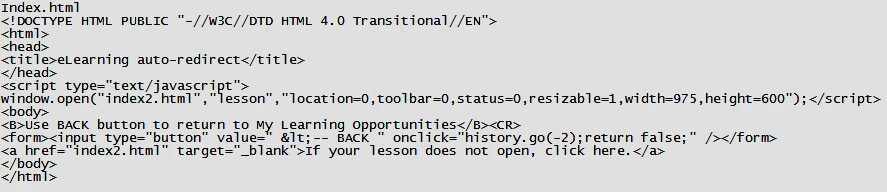
This above code worked "perfectly" EXCEPT the major problem was that the lesson session information (i.e. what slides were viewed by the student in a prior session) was no longer retained. Why is that?
Any enlightenment is appreciated... Thank you. 
Shawn
 AdChoices