


Participating Frequently
September 3, 2015
Question

question answer caption text is being truncated inappropriately

  • September 3, 2015
  • 1 reply
  • 880 views

in ac9 9.0.0.23

i create multiple choice questions, other types as well, some of the answers are longer than the default answer caption,


problem 1)

there is no way to resize the answer caption in any master template.  how can I do this?

so instead i resize the answer caption in the cptx (see top image), and it looks great.

problem 2)

then when i deploy and view this question (answers are randomised in global defaults, they must be since some questions are match questions), in the deployed site, the long answer now is truncated, and cannot all be seen.

there must be some way to fix this, but i have not been able to find a solution.

i tried to turn on autoresize captions as follows:

  • In an open project, select Edit > Preferences (Windows) or Adobe Captivate > Preferences (Mac OS).
  • In the Category panel, select Defaults from the Global menu.

  • Select Autosize Captions.

    but it made no difference

    if i turn of answer randomisation, it works fine, but then the exam is broken as it becomes to easy, and also the matching questions require randomisation anyway.

    the solution must involve randomisation being turned on please.
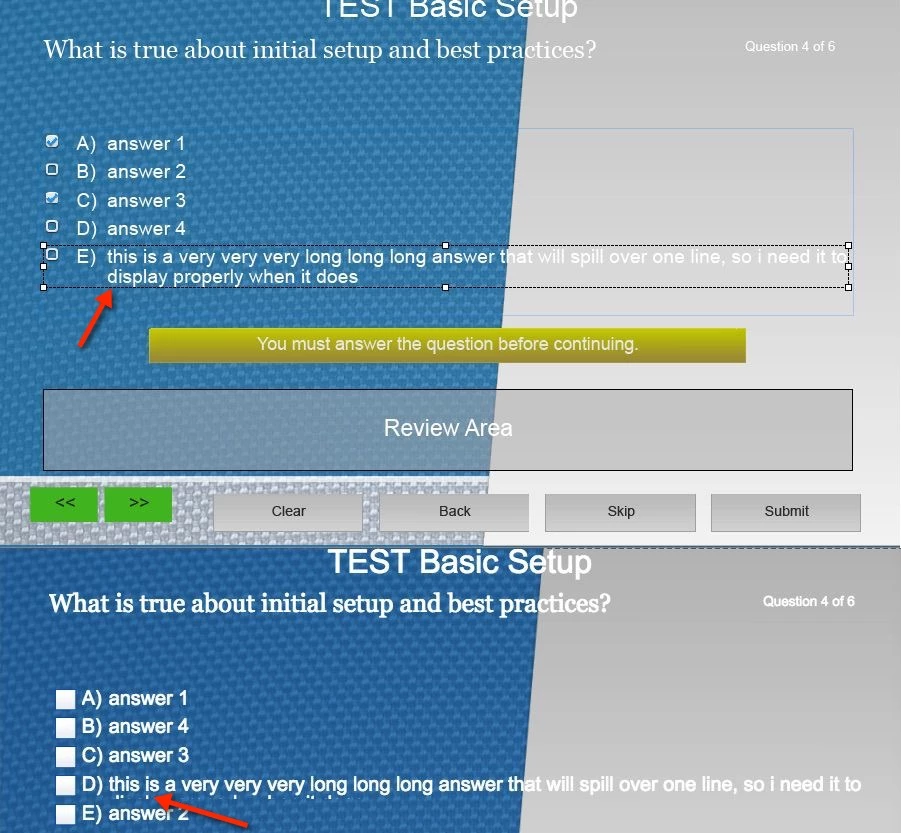

    thanks, Neil

    This topic has been closed for replies.

    1 reply

    RodWard
    Community Expert
    Community Expert
    September 4, 2015

    If you want the answers to randomize properly with equal space in between and not cutting each other off then you need to make ALL of the answer captions exactly the same size (height).  This will need to be done in each individual question slide.

    warthog99Author
    Participating Frequently
    September 4, 2015

    it would be truly wonderful if editing the size and position of the answer caption was possible in a global fashion, although this is not possible in the application GUI, does anyone know the underlying file structure well enough to point me in the right direction so that I can change some type of properties file so this becomes a more global setting?

    RodWard
    Community Expert
    Community Expert
    September 4, 2015

    These sort of things are normally controlled via Object Styles or how the Master Slides are set up.

    But in Captivate there is no setting in either of these areas that can allow you to control the default height and width of the Answer Caption.

    If you want something like that, by all means lot an enhancement request. 

    My workflow is just to set up a Captivate CPTX with all the slides formatted the way I like them and then use this file as a starter template for new projects.  In this template I have at least one example of every type of quiz question pre-formatted to look the way I want.

    That's about as close as you're going to get to what you want with current Captivate technology.