Known Participant
February 24, 2021
Answered

Question slides that jump upon success to a specific slide depending on what the previous slide was

  • February 24, 2021
  • 1 reply
  • 563 views

Hi!

I'm new using captivate, I did a simple project earlier, but now I'm working on something a little more complex.

For this project, 3 paths are available to the learners. They can only choose one of these.

These 3 paths are made up of 4 information slides and 4 question slides that alternate that way: Info, Quest, Info, Quest, Info, Quest, Info, Quest. What that means, is that there are 12 different information slides.


But what about the question slides? Do I have to make 12 too? Or can I make only 4 of them, and tell them to go, upon success, on a specific slide depending on what the previous slide was? (something like, if previous slide was number 1, upon success go to number 3 or if previous slide was number 9, upon success go to number 11 or if previous slide was number 17, upon success go to number 19)

 

This topic has been closed for replies.
Correct answer Lilybiri

I will when I try it. I'm not quite there yet, and I'm not familiar with variables and advanced actions.


You will need to create one user variable. Open Project, Variables. Click 'Add new'. Type 'v_slide' in the field Name. Click the Save button.

For the Next buttons: it is a simple action from the dropdown list in the Actions tab of the button. You can choose whatever type of button you like.

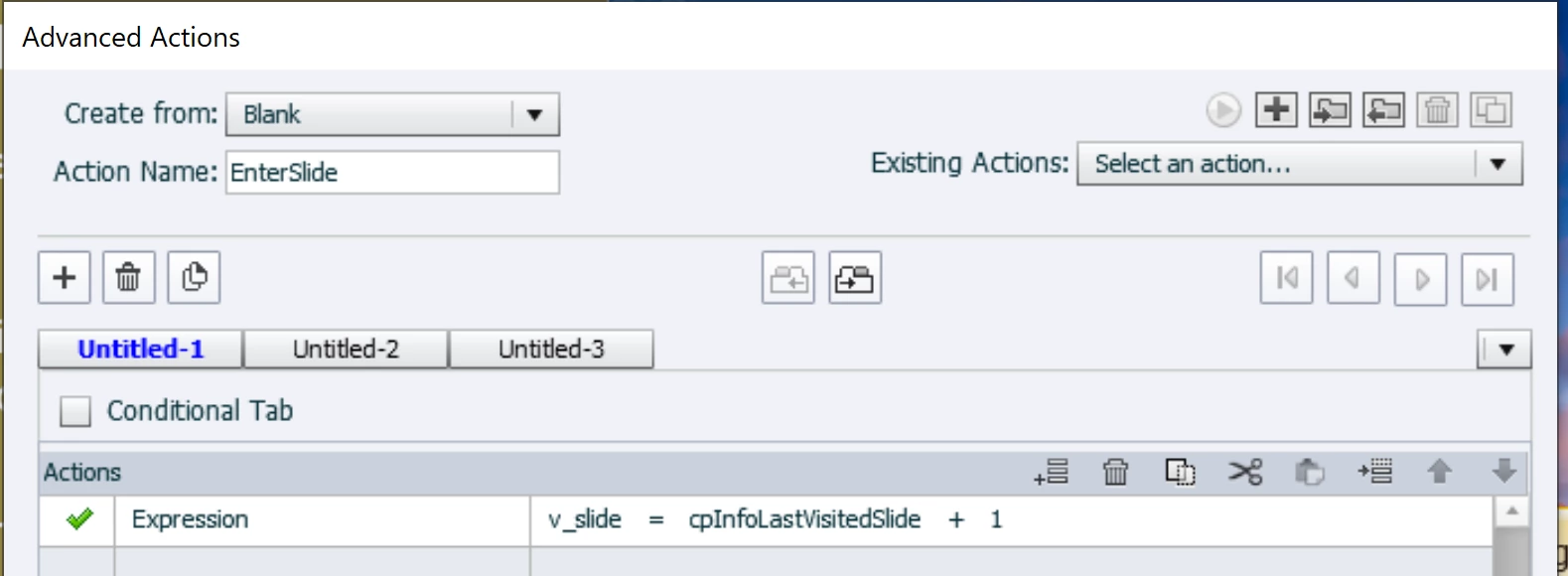
For the Expression action that is not possible, you need to:

  • Open Project, Advanced Actions.
  • Type an Action name, maybe EnterSlide
  • Double click in the second column, click E couple of times until you see 'Expression' and confirm with enter
  • In the third column, choose 'variable' from the dropdown list and choose v_slide (which is the user variable you have created) 
  • After = do the same but choose cpInfoLastVisitedSlide
  • Open the dropdown list with the operators and choose +
  • End with a 'literal' after the operator and type '1'
  • Save the action and close the dialog box
  • Select the slides 13-15 in the Filmstrip
  • In the Actions tab for Enter choose 'Execute Advanced Action'
  • There is only one action 'EnterSlide', confirm with Enter

I think you can do the rest which is not about advanced actions.

1 reply

Lilybiri
Legend
February 24, 2021

Not sure to understand. This is what I get:

  • There are 3 paths, each has 4 content slides. 
  • There are only 4 question slides, and same question slides are used for each path
  • You want always a sequence content-question

It is important to remain in the quiz scope. You don't tell what has to happen with a Failure on the question slides?

If you have three groups:

  1. Content group 1: slides 1-4
  2. Content group 2: slides 5-8
  3. Content group 3: slides 9-12
  4. Question group: slides 13-16


In that set up you would need:

  1. For the next button on the first content slide of each group: 'Jump to slide 13'
  2. For the next button on the second content slide...   'Jump to slide 14'   etc

For slides 13-15, an advanced action On Enter which uses a user variable v_slide:

   Expression v_slide = cpInfoLastVistedSlide +1

For the Success (and the Failure action):

   Jump to v_slide


The last question slide (16) will be followed by the score slide and an end slide. Always use an extra slide after the results slide.

Known Participant
February 24, 2021

Thanks a lot, that's exaclty what I was looking for.

Lilybiri
Legend
February 24, 2021

If it works, could you mark the answer as being correct?