Participating Frequently
September 17, 2012
Answered

Question slides will only accept one particular answer before continuing

  • September 17, 2012
  • 2 replies
  • 701 views

Hello

I have recently started to use Captivate 6 after previously using Captivate 5. I have created a project in full with true or false question slides but when I tested the project I noticed it will only let me choose one particular answer before continuing. For example if I select false then click the submit button nothing happens and it does not progress to the next slide, but if I select true and submit it moves to the next question slide. This has happened throughout the project ( Six Modules in total) and I cannot find a solution. I never had this problem when using Captivate 5, Can anybody help me with this?
This topic has been closed for replies.
Correct answer VikramGaur

Hello,

Welcome to Adobe Forums.

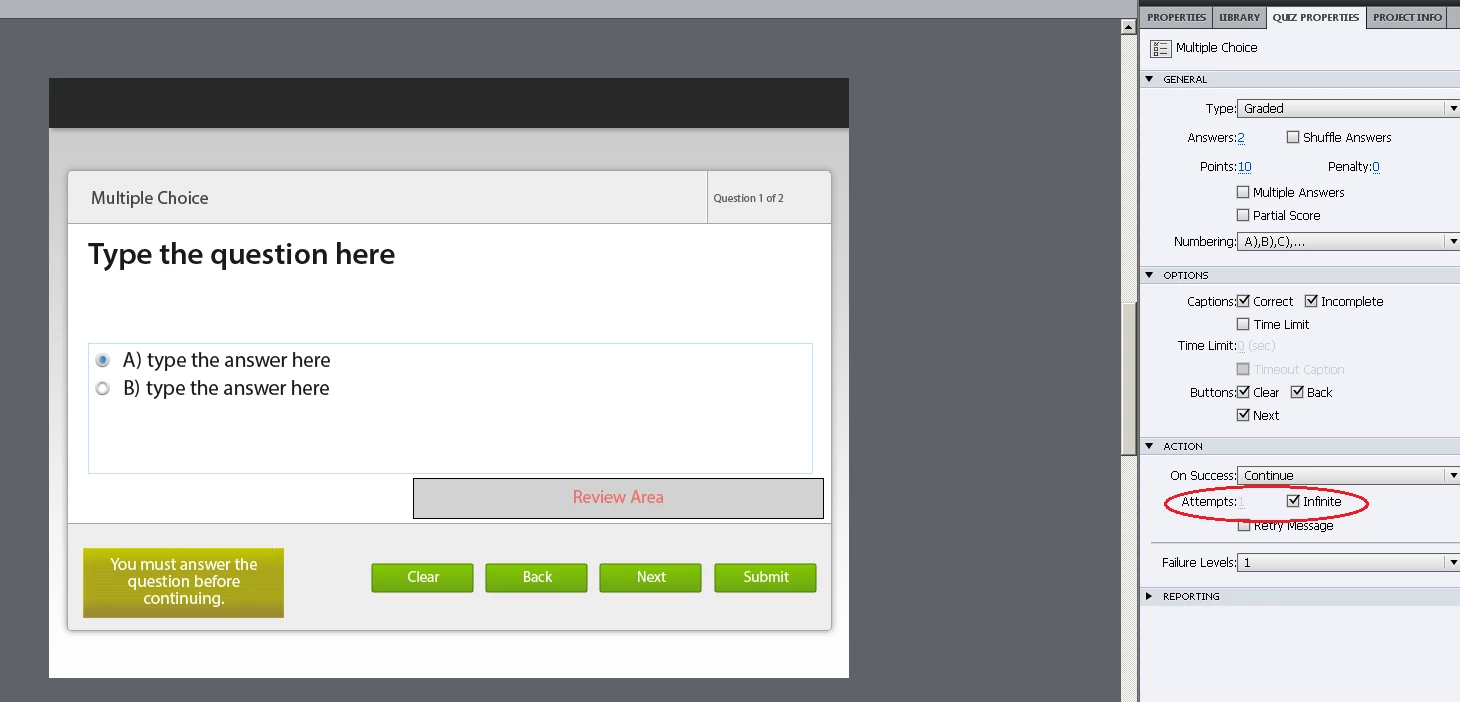
You need to check for the "Attempt" for that question slide (In Quiz Properties -> Under Action)

If you have infinite or >1 attempts, then slide will not progress to the Next Slide.

Hope this helps !!

Thanks,

Vikram

2 replies

johnb1981Author
Participating Frequently
September 17, 2012

Thanks very muck Vikram, I'll give that a try as they are set to infinite

VikramGaur
Adobe Employee
Adobe Employee
September 17, 2012

Great, will be waiting for your response.

Thanks,
Vikram

johnb1981Author
Participating Frequently
September 17, 2012

Yes that has worked, thankyou for your responce. Is there a reason that 'infinite' does not work?

VikramGaur
Adobe Employee
VikramGaurCorrect answer
Adobe Employee
September 17, 2012

Hello,

Welcome to Adobe Forums.

You need to check for the "Attempt" for that question slide (In Quiz Properties -> Under Action)

If you have infinite or >1 attempts, then slide will not progress to the Next Slide.

Hope this helps !!

Thanks,

Vikram