

Question X of Y Progress Indicator numbers are incorrect
Hi,
I'm using Captivate 9.0.2.437. (Hopefully captivate 2019 soon).
I have a captivate project with 4 Knowledge Check questions scattered throughout the course.
Then at the end of the project I have 8 graded Question slides.
The x of y total question progress indicator (y) is always 4 on the 8 graded questions at the end. The progress indicator is not displayed in my Knowledge Check questions (thankful that is not displayed - not my expectations that it should be on KCs).
I end up with .....2 of 4, 3 of 4, 4 of 4, 5 of 4, 6 of 4 and so on in the 8 graded questions at the end.
These eight questions are graded "Questions" in the Quiz properties.
I assumed the KC questions were not graded, and were just practice questions, and that they would not counted in the progress indicator. But it is odd that y indicator is 4 in my 8 graded questions.
Here is a glance at my Advanced Interaction table.
Here in the below image you will find 2 (of the 4) Knowledge Questions. They have a value of Points = 0 and Included in the Quiz is blank.
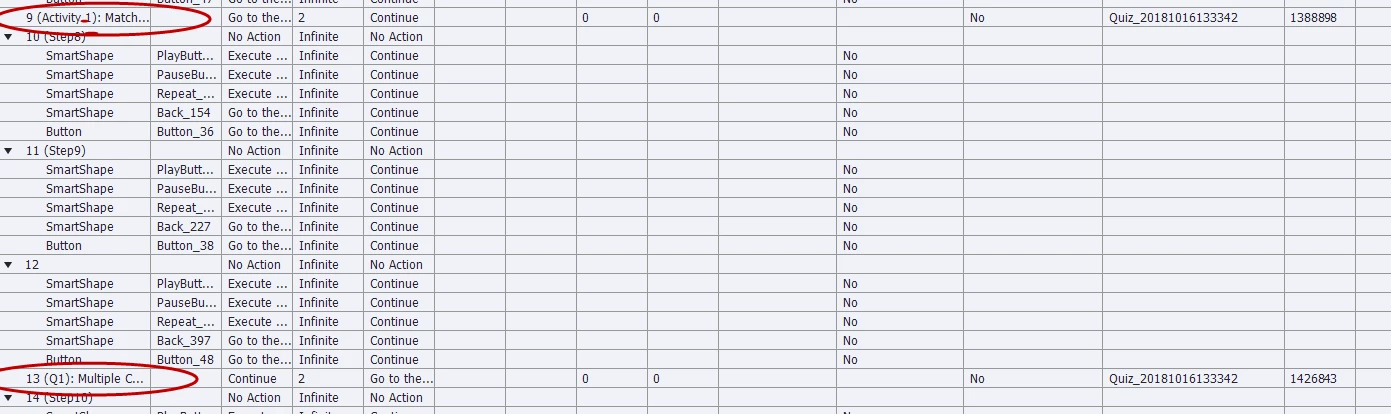
Then, below are the exam/graded quiz questions. 8 questions, each have points to be reported, however, Include in quiz is blank. I'm assuming include in quiz needs to be yes. These are the questions with the incorrect progress indicator, and they need to go towards the points scored reported to the LMS.

What could be causing this incorrect progress indicator? I have not tested this for score reporting yet, and assume that part will also not be incorrect.
Any advice on these topics (progress indicator x of y and grade reporting) are appreciated.
Thanks,
Dan


 AdChoices