
laurieb4674
Known Participant
August 15, 2018
Answered

Quiz - answer numbering option

  • August 15, 2018
  • 2 replies
  • 301 views

I am working in CP 10.0.0.192. I have been tasked to make about 30 graded "Test (Quiz) Projects" ranging from 20 to 50 MCQs in each. Questions/answers will be sent to me in GIFT format for easy import. I am building a shell to use for this and I haven't seen where I can change the project default numbering "A), B), C), ..." for the answers. Is this possible? I know you can edit each individual question to make this change, but I was wondering if it can be done for a whole project? I have been searching this forum and the Adobe help site and have not found anything. Thanks in advance for your feedback.
    This topic has been closed for replies.
    Correct answer Lilybiri

    You are not using the most recent version which is 10.0.1.285.

    Formatting of individual answers is a pain. You cannot edit them on the quizzing master slides. The numbering is not part of the Default Quiz Answer style. That is the bad news. It would be so easy if it was either part of the Theme  or could be included in the Preferences.

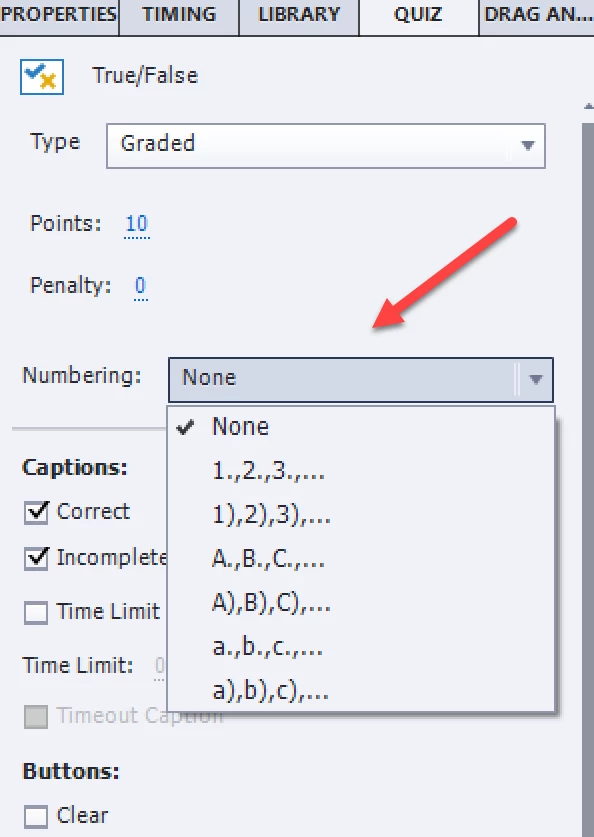
    The quickest solution, which I'm using has to be done after insertion of the quiz slides. Select all the quiz slides in the Filmstrip, go to the Quiz Properties panel and change the Numbering:

    2 replies

    laurieb4674
    Known Participant
    August 16, 2018

    Perfect, thanks Lily!! That will certainly work without much effort.

    I'm aware there is a more current version of CP available, would it make any difference for this particular situation?

    Updating becomes complicated with a team of developers and wanting all of them using the same version. I'd have to give any upgrades a good test run before I could ask for the team to get it.

    Lilybiri
    Legend
    August 16, 2018

    It wouldn't have made a difference for this use case, but fixed a lot of bugs, especially for Mac users. However AutoPlay is now turned of by default for HTML output.

    Lilybiri
    LilybiriCorrect answer
    Legend
    August 15, 2018

    You are not using the most recent version which is 10.0.1.285.

    Formatting of individual answers is a pain. You cannot edit them on the quizzing master slides. The numbering is not part of the Default Quiz Answer style. That is the bad news. It would be so easy if it was either part of the Theme  or could be included in the Preferences.

    The quickest solution, which I'm using has to be done after insertion of the quiz slides. Select all the quiz slides in the Filmstrip, go to the Quiz Properties panel and change the Numbering: