
Inspiring
November 12, 2015
Question

quiz button text

  • November 12, 2015
  • 2 replies
  • 559 views

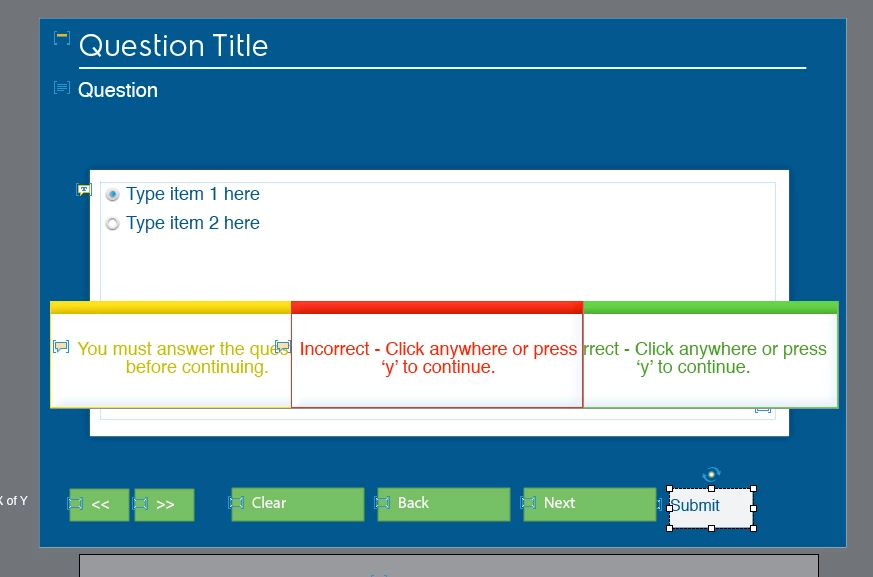
I've noticed a really strange thing on the master slide for Quiz questions. There doesn't seem to be a way to adjust the position of the text on the buttons. When I click on the "Submit" button, I can change the kind of button, the color, the text color, the font, the size of the button, but I am not seeing where I can set "SUBMIT" text to be in the center of the button. Perhaps not a big deal to some folks, but the text sort of defaulting to be left justified just doesn't look as polished as text that you center both horizontally and vertically. Is there a global setting somewhere by chance?
    This topic has been closed for replies.

    2 replies

    hoffmato888888
    Participant
    February 24, 2016

    I am having the same issue and I just created a new theme in a responsive project in Captivate 9.  Has anyone else had this issue?  Also, the quiz buttons look correct in size/position on the Master, but on the actual quiz pages they are tiny.  Any help would be appreciated.

    Lilybiri
    Legend
    November 12, 2015

    It is Captivate 9, that is visible on the screenshot. But which Theme please?

    jpm226Author
    Inspiring
    November 16, 2015

    Its a theme that was made a while ago...I made it using a blank project. When I am in slide master there doesn't seem to be a way to control that text on those question buttons. all the other buttons seem to have that center vertical and horizontal option in properties, was just curios if I wasn't looking in the right place. Not a big deal, it just tends to aggravate me when I look for it lol

    Lilybiri
    Legend
    November 17, 2015

    That could be the issue, if this theme was created in a previous version? Do you see the proper styles in the Object Style Manager?