
AHwalek
Inspiring
May 26, 2016
Answered

Quiz button text - Centering

  • May 26, 2016
  • 2 replies
  • 636 views

Hello,

     I had this nested in an old post and apologize for the duplicate entry however I really need help.

When I first create a quiz I get nice looking buttons like those displayed below.

If I then go to a different break point the buttons resize to be too small as shown in the image below. The buttons are the same (too small) when returning to desktop breakpoint as well.

When trying to resize the buttons they only resize left justified. as shown in the image below.

There isn't anywhere in the Object Style Manager that allows you to center justify the text.
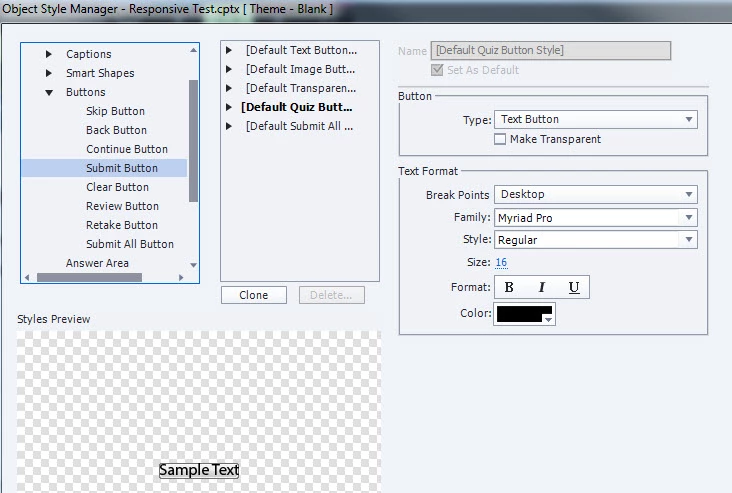
How do you get decent looking buttons on your responsive project's quizzes?

Thanks,

     Tony

-Using Captivate with Responsive template
    This topic has been closed for replies.
    Correct answer AHwalek

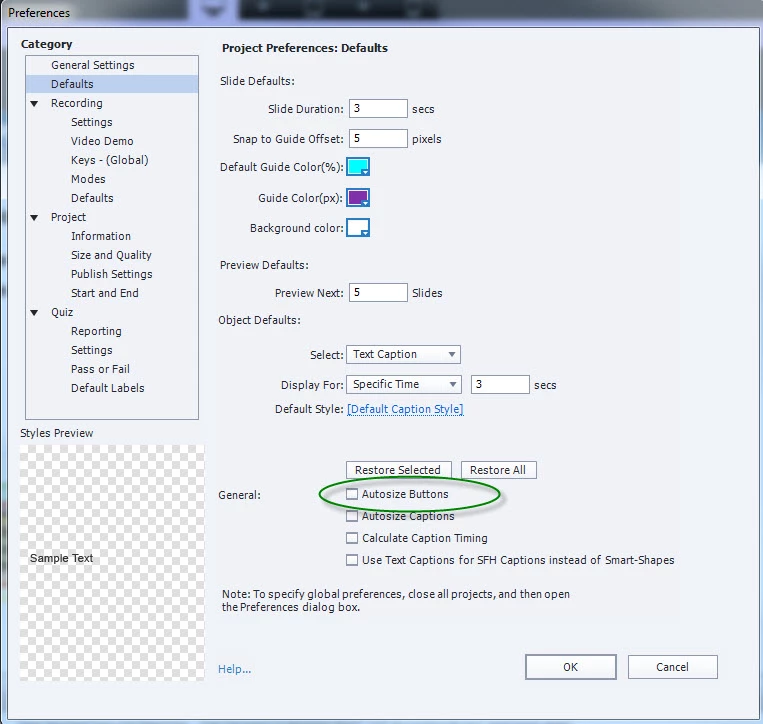
    It turns out the option "Autosize Buttons" in the preferenaces was the reason the buttons shrunk down to the size of the text. Uncheck the button and make another new quiz page and they won't resize.

    2 replies

    AHwalek
    AHwalekAuthorCorrect answer
    Inspiring
    May 27, 2016

    It turns out the option "Autosize Buttons" in the preferenaces was the reason the buttons shrunk down to the size of the text. Uncheck the button and make another new quiz page and they won't resize.

    Lilybiri
    Legend
    May 28, 2016

    Sorry, was away for some time. This seems strange, because the default setting is to have that option (Autosize button) unchecked. Someone must have activated it. I just wanted to add this for the sake of other users: in the version you are using (which is 9.0.1.320 since you have the Guide color option) but also in the first release of 9 and in 8, the default option is to have neither buttons, nor captions autosized.

    AHwalek
    AHwalekAuthor
    Inspiring
    May 26, 2016

    I'd like to add that after resizing the buttons, they shrink back down to the size of their text when you go to a different break point.