


Participating Frequently
March 23, 2023
Question

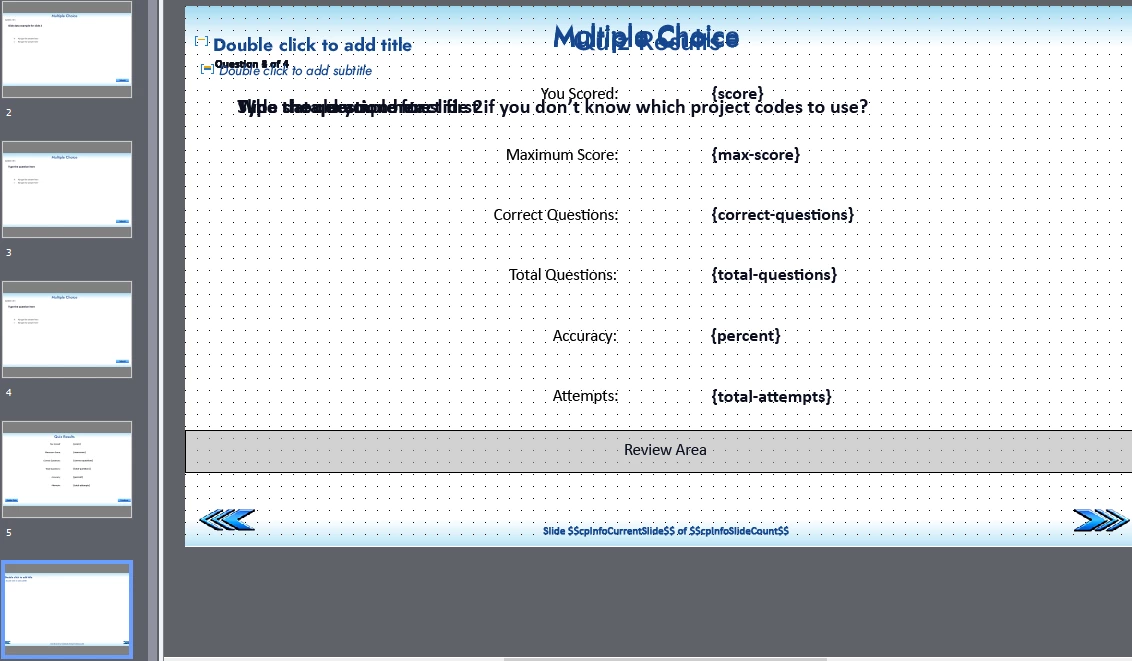
Quiz content from master overlapping data

  • March 23, 2023
  • 1 reply
  • 602 views

Hi all, thanks so much for being here. I have a weird thing happening where multiple quiz slides (and the results slide) are stacking up on top of each other.

This is my first time really using a master slide, so I think it has something to do with that, and also somehow the setting "display for the rest of the project".

Essentially, I added a master slide to control the appearance of buttons and the feedback bar, without having to change it every single slide individually. The first quiz slide looks good, then when I move on to the next (2nd) quiz slide, I also see the information from the first slide as well.

When I move on to slide 3, I also see slide 1 & 2. You get the idea. Since it is a master, I can not delete the content on a lower layer, nor can I uncheck anywhere "Display for the rest of the project"

If anyone has any insight, I sure could use the help.

This file was originally created using the function "New Captivate file from Template"

I have the original master slides saved in a CPTL.

For some reason when I attempt to upload the cptx, I get this error on this site:

Correct the highlighted errors and try again.

  • The attachment's error with quiz slides 1 .cptx content type (application/x-captivate) does not match its file extension and has been removed.

This topic has been closed for replies.

1 reply

Lilybiri
Legend
March 23, 2023

First of all you should never use a cptl file to create a Captivate project, because that workflow is rather buggy.

Secondly: all quiz slides need to be based on the quizzing master slides in the Theme you are using if you want to use all the functionalities for Quizzing which are included in Captivate. You cannot just create another master slide. You could duplicate an existing quizzing master slide (you have 4 of them) and eventually the results master slide and do some editing. But never delete any embedded object. An embedded object has no individual timeline, but lot of inbuilt programming.

You don't save master slides in a template but in a theme. Maybe this is only a lot of wrong use of terminology, but since you mentioned the extension cptl, I know you are talking about a template. Master slides, object styles, etc are part of a theme. See this older post:

https://blog.lilybiri.com/whats-in-a-theme-a-template

Timing any object for the rest of the project will indeed have all those objects on all slides. I really wonder why you are doing this. 

Sorry to ask: are you completely new to Captivate? Or maybe you returned to Captivate, and are still using outdated workflows which were OK before version 6? The most recent version is 11.8.1, have no idea which version you are using which could be clarifying.

Here is a link to one article of a basic Quiz courses:

https://blog.lilybiri.com/quiz-basics-2-submit-process


Participating Frequently
March 23, 2023

Hi Lily, I am neither brand new, nor returning.

And I am using the correct terminologies, not mixing up terms.

I am using a slide master because I thought that this was a way to shortcut processes to make my slides all have the same look and feel, same button style etc without needing to re-create them each slide or copy and paste them.
Just want to be able to load a new "template based" slide over and over, with a company logo, and text placeholders already in place. But based on what you're telling me, I've managed to contrive such an insane use of a master slide and then saving it as a CPTL that I've managed something totally baffling. I'm amazed, haha. I was just making 5 modules for the same course and wanted them all to look the same. For the content slides, the changes in different masters caused no problems. I have no idea how I came up with this, but I have never used themes at all. I guess I thought that master slides could work like how you describe themes.