Inspiring
October 10, 2019
Question

Quiz functionality
  • October 10, 2019
  • 4 replies
  • 292 views

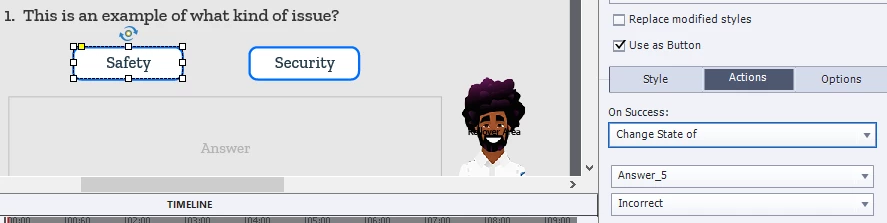
I am trying to figure out how this quiz was built. It has customized correct/incorrect feedback. I don't see the feedback info on the Captivate canvas.

    This topic has been closed for replies.

    4 replies

    Lilybiri
    Legend
    October 11, 2019

    You do not see the multistate object which has the correct and incorrect text in the Timeline panel?

    Do you have similar slides like this? If yes, check if it is not on a previous slide, timed for the rest of the project. It cannot be on the master slide since you need to address it in the action.

    Inspiring
    October 11, 2019


    I still can't figure out where the correct incorrect text isw coming from. It's not in any layer I see even if it is transparent.

    Lilybiri
    Legend
    October 11, 2019

    Check the Object state panel for the feedback message. I would have a Normal state which is invisble (alpha and stroke set to 0. Then you do not need to hide/show the message.

    RodWard
    Community Expert
    Community Expert
    October 11, 2019

    From your screenshot it looks like the Smart Shape buttons on screen change the Object State of the Answer object when the button is clicked. 


    If the object does indeed have States that should be visible, then the problem may be that the answer object is set to not be Visible in Output, i.e. it's hidden from view by default and needs to be SHOWN by an Advanced Action.  But your button is currently only executing ONE action, to change the state of the object.  If the object is also hidden by default, the button would need to execute at least TWO actions.  To achieve that you would need to create an Advanced Action and set the button to execute that action, rather than the way you currently have things set up.