Participant
April 11, 2013
Answered

Quiz not advancing after incorrect answer (quiz uses user variables to show wrong answers)

  • April 11, 2013
  • 1 reply
  • 704 views

Hello All,

Long time lurker, first time poster. Hopefully someone can help me.

After viewing this excellent video on the adobe captivate blog "so what were the right answers anyway" I created a quiz with user variables and a conditional advance action. It displays red crosses next to the each question that was incorrectly answered at the end of the quiz.

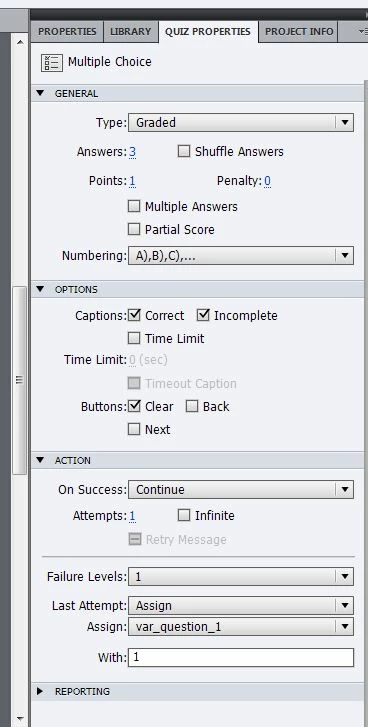
  • I set up user variable for each question with a value of 0. On an incorrect answer the variable would be set to 1.
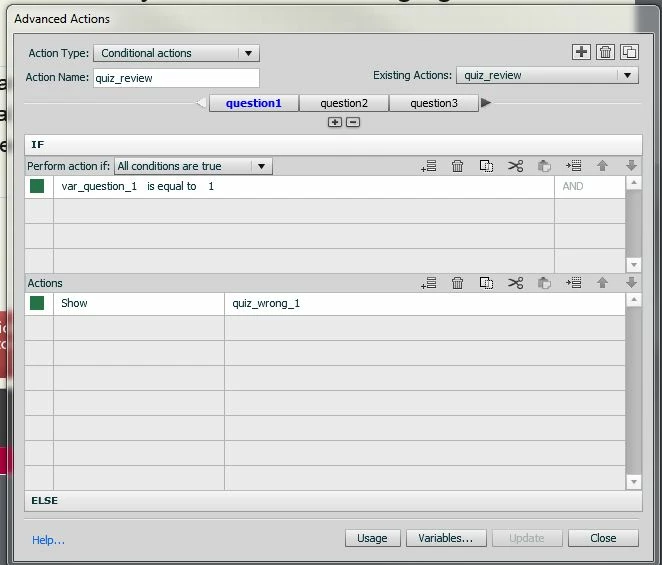
  • At the end of the quiz is a slide which lists the question and shows a red cross next to each question with a variable set to 1. uses conditional action which is triggered "On Enter"

This works, but my problem is when I preview the quiz (in browser or as SWF), on an incorrect answer the failure caption appears but will not actually advance to the next question when I click anywhere or press y. It works OK on correct answers.

I can sovle this by adding a next button, but I want to understand what I'm doing wrong.

  • Using captivate 6.0.1.240 (boxed copy)
  • windows 7
  • images on quiz properties and  conditional action below

Any help appreciated.

Regards

Jacob C
This topic has been closed for replies.
Correct answer Lilybiri

I tested this work flow on 6.1.319 and it works fine. So it is a bit guessing in the wild... no 6.0.1.240 around for the moment. Seems strange, because a simple action like your Assign action should normally release the playhead. But of course it is a question slide and they do not always behave as expected. Could you try to replace the Assign action by a standard advanced action with 2 statements, like this:

  • Assign var_question_1 with 1
  • Continue

And please, let me know if it works? This could be a difference between the two versions, but not sure at all.

Lilybiri

1 reply

Lilybiri
LilybiriCorrect answer
Legend
April 11, 2013

I tested this work flow on 6.1.319 and it works fine. So it is a bit guessing in the wild... no 6.0.1.240 around for the moment. Seems strange, because a simple action like your Assign action should normally release the playhead. But of course it is a question slide and they do not always behave as expected. Could you try to replace the Assign action by a standard advanced action with 2 statements, like this:

  • Assign var_question_1 with 1
  • Continue

And please, let me know if it works? This could be a difference between the two versions, but not sure at all.

Lilybiri

Participant
April 11, 2013

Thanks for replying. Replacing assign with the standard advanced action works fine.

A bit frustrating that I can't figure out what's going on, but I actually prefer what you suggested than just using assign.

It seems more "sturdy" stating explicitly that it should continue.

Jacob

Lilybiri
Legend
April 11, 2013

Agree, strange because in CP6.1 it works in the original way you used. I thought this could be the cause, because the original actions both for Success/After Last Attempt are 'Continue'.

Lilybiri