Participant
March 12, 2018
Answered

Quiz not reporting correct or incorrect

  • March 12, 2018
  • 1 reply
  • 1454 views

I uploaded a quiz using the gift format and am only seeing the correct or incorrect object state pop up for some questions and not all.

Is there anything else I can check to make sure it's turned on? I have never bumped into this problem when manually creating quiz so not sure if it's because i uploaded from gift format.

    This topic has been closed for replies.
    Correct answer Lilybiri

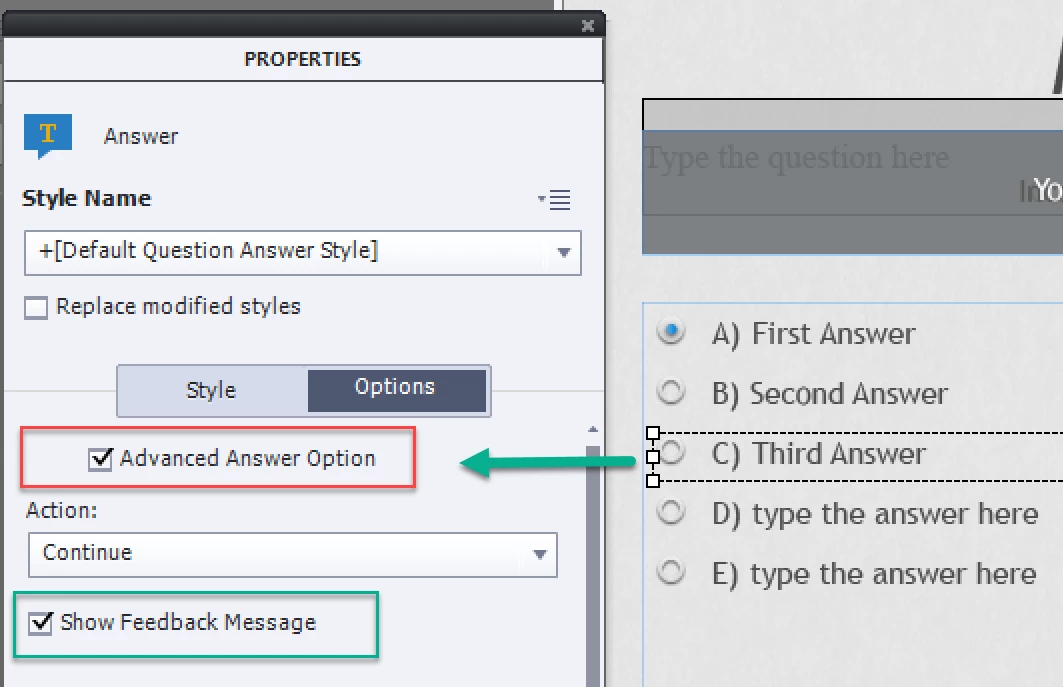
    This makes a lot more sense. What I had done was delete the Advanced Answer Option but never thought I had to activate Show Feedback message, I think this is why i wasn't getting my incorrect or correct feedback?

    I can't seem to find these options though in Captivate 9 to manually activate or deactivate. Where exactly are they located?

    I actually wasn't aware of the Advanced Answer Option until seeing it now by uploading quiz through GIFT format.


    The reason I set up a Quizzing workspace is due to Advanced Answer option and partial scoring/penalty (with Propeties panel in the left docking station and Quiz Properites in the right docking station). To see Advanced Answer option you need select an answer contgainer, go into the Properties panel and you'll see the option Advanced Answer there. It is the same in 9 and 2017:

    1 reply

    Lilybiri
    Legend
    March 12, 2018

    Can you see any consistency like which type of questions? I use GIFT as well, diidn't have such an experience yet. Maybe post a screensot of the GIF text for those problem questions?

    selgirlyAuthor
    Participant
    March 12, 2018

    I actually thought it was just questions with multiple answers then realized it's some true/false as well. I did notice it tried to set my feedback answers in a different area at first instead of through the incorrect object shape. So i deleted the answer feedback. I had never seen that before. I currently have simple gift format for example:

    question

    {

    ~%25%answer1

    #the correctanswer is1

    ~%25%answer2

    #the correctanswer is1

    ~%25%answer3

    #the correctanswer is1

    ~%25%answer4

    #the correctanswer is1

    }

    question

    {

    =True

    ~False

    #correct answer is True

    }

    David Burnham HBA
    Inspiring
    March 12, 2018

    Hi you might find this link helpful from moodle docs on how to format GIFT format Questions. It will give you an understanding of how to format the questions to import using the GIFT import in Captivate.

    https://docs.moodle.org/23/en/GIFT_format

    I give this reference to students in my Captivate classes.