Participating Frequently
November 30, 2010
Question

Quiz not working when published to SWF

  • November 30, 2010
  • 1 reply
  • 1227 views

I am using Captivate 5 on a Windows 7 32-bit machine.

Because I cannot publish to .exe (the enter key causes the file to close, as per this thread), I am attempting to publish my project in Flash. When I do so, everything works fine except for the quiz questions. All of the quiz questions come up with the message "You did not answer this question completely" before an attempt is made at the question. The quiz is completely non-functional.
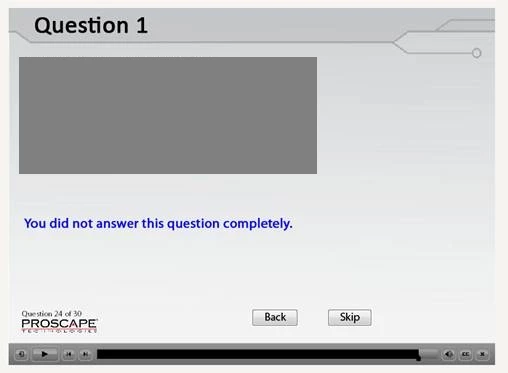
The question itself has been blocked to project proprietary information.

This topic has been closed for replies.

1 reply

Lilybiri
Legend
November 30, 2010

Hello,

Could you please tell how the answer is submitted? I'm asking this because on your screenshot I do not see the Submit button at all. Normally this button triggers all the functionality of the quiz, and it is by default the only button you cannot dismiss. You can choose to not have the Skip, Back and Clear button, but not the Submit button because of its importance. I'm really puzzled: you can select this button on the stage, but delete will not be functional. The only way to have the situation in your screenshot is to make this button transparent and delete the Text 'Submit'. Did you assign a shortcut to replace this button?

Lilybiri

Participating Frequently
November 30, 2010

That's exactly the problem. The quiz is designed with all of the buttons, but when published to SWF this is the first thing that comes up when navigating to the quiz page. It works fine in the preview and in the .exe version.

Participating Frequently
December 2, 2010

Hello There,

Is it an upgraded project? If yes, did you use the image button for submit and enabled 'transparent button' option? if yes, can you uncheck and try again? If none of these resolve, can you send us the project to viswanat@adobe.com? You can have dummy data if it is confidential info.

BTW, EXE closing on pressing enter key has been fixed and you can find the fix at http://blogs.adobe.com/captivate/2010/08/unable-to-open-exe-files-published-from-adobe-captivate-5.html

Thanks,

Vish