SaraAdvantage
Participant
September 7, 2017
Question

Quiz Points Calculating Incorrectly

  • September 7, 2017
  • 1 reply
  • 107 views

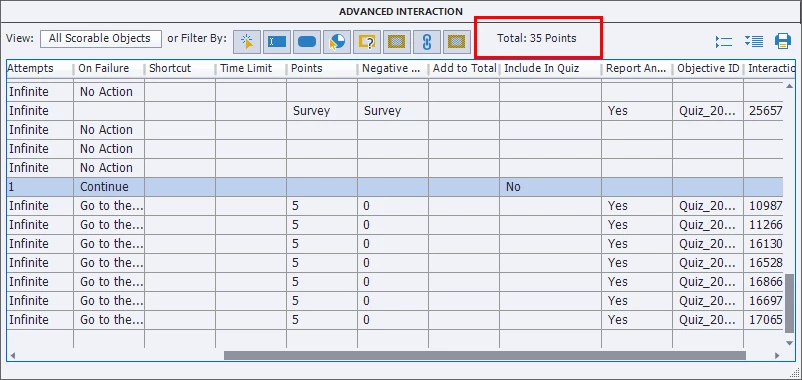
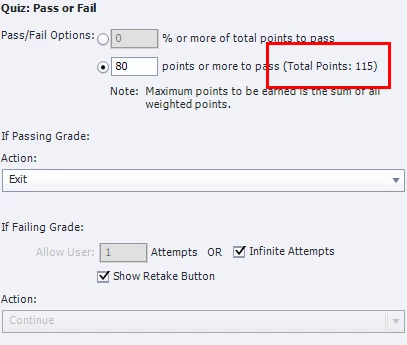
I'm not sure what is happening in my project, but the total quiz points in preferences is calculated incorrectly. I've tried to lower the points from 10 per question to 5 to see if it updates and corrects itself but it is still incorrect. Advanced actions show 35 points, which is correct - 8 questions, 5 points each. Quiz preferences show a total of 115 points. Any ideas on what's going on? So strange...
This topic has been closed for replies.

1 reply

RodWard
Community Expert
Community Expert
September 8, 2017

Check in the Advanced Interaction dialog to see if there are any other interactive objects in your project that are set to report a score to the quiz.

I never use the Points method for Quiz Pass or Fail.  Using Percentage of total points to pass is safer and less maintenance.

RodWard
Community Expert
Community Expert
September 8, 2017

I can see in the top of your screenshot of the Advanced Interactions dialog that it says there are only 35 points in all scorable objects, but it's still worth checking. 

If you cannot find the issue, you may have a corrupted project.  Try copying all slides into a new project shell and see if the issue goes away.