
Known Participant
February 2, 2016
Answered

Quiz pref default labels - global change to already created test questions

  • February 2, 2016
  • 3 replies
  • 310 views

I have created 7 lessons with a combined total of 185 questions.  After testing my project and a request from the client they want to default label to change.  Instead of the default - For example...I need to change to "Incorrect.  Review quiz carefully."  I change the label in the quiz prefs but how do I update the question sides with the new label? 
    This topic has been closed for replies.
    Correct answer BDuckWorks

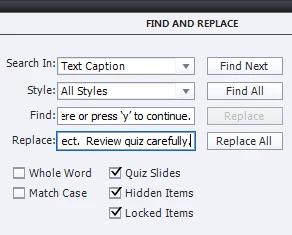
    Yes, you do need to edit each caption, but in this case it doesn't need to be a manual exercise.

    Use 'Find and Replace' on the Edit menu:

    and, Bob's your uncle!

    3 replies

    Known Participant
    February 3, 2016

    Thanks everyone.  I think it is strange the other quiz presences changes make global updates but not the labels.  I learned the hard way.  The 'y' is hard for the find and replace to pick up but I got through it! 

    Lilybiri
    Legend
    February 3, 2016

    What is part of a style or a master slide, can be applied to existing question slides, but labels are not considered to be styles, nor part of the master slide.

    BDuckWorks
    BDuckWorksCorrect answer
    Inspiring
    February 3, 2016

    Yes, you do need to edit each caption, but in this case it doesn't need to be a manual exercise.

    Use 'Find and Replace' on the Edit menu:

    and, Bob's your uncle!

    RodWard
    Community Expert
    Community Expert
    February 3, 2016

    Stone the crows!  I forgot all about the Find and Replace option.  Well spotted cobber.

    RodWard
    Community Expert
    Community Expert
    February 2, 2016

    Changing the Quiz Preference will only change newly added question captions.

    You need to edit each of the existing captions manually.