


Participating Frequently
January 12, 2024
Question

Quiz Questions Occasionally Not Loading/Rendering Correctly

  • January 12, 2024
  • 1 reply
  • 595 views

Hi all, I've created several quizzes in Captivate and host them in courses on Adobe Learning Manager, however we encounter issues where quiz questions don't always load correctly. For example, the question itself or one or more multiple choice answers (or images if those are included in the quiz (although most of our quizzes don't have images)) may not be visible at all, which obviously complicates the learner's process of trying to determine and select the correct answer. We've gotten by with this bug so far and apologized to learners as we go, but management is wanting the data we get from these quizzes to be more reliable, and in it's current form it's not. 


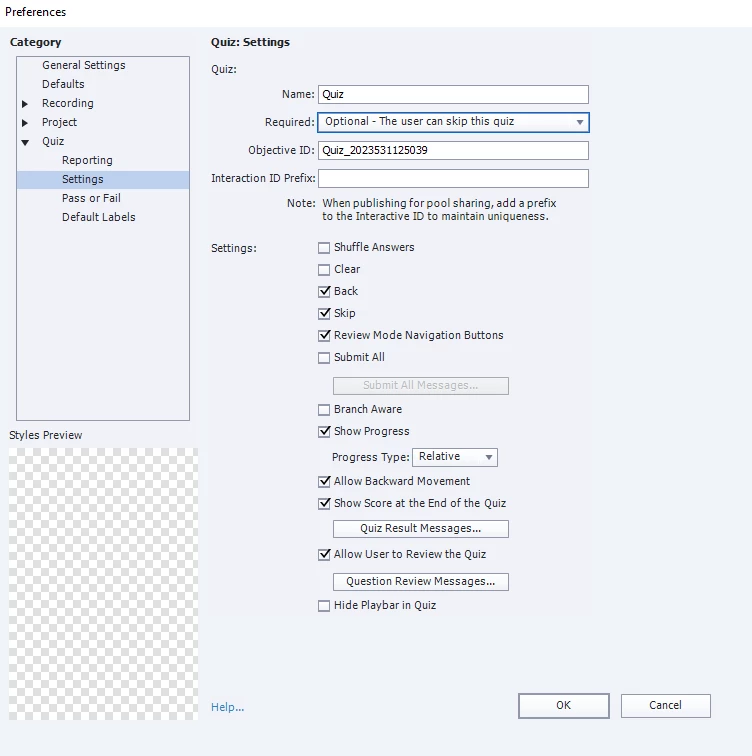
It's not something we've been able to replicate consistently; I have no clue what's triggering the image not to load. To provide additional context that I've seen requested in other posts here, I'm using Captivate 19 Version 11.5.5 (64 bit), and we use Adobe Learning Manager as our LMS. Below is a screenshot from the Quiz settings page, and many of our quizzes make use of the question pool feature of Adobe as well. If anyone has any insight on how to fix this issue I would greatly appreciate it!
    This topic has been closed for replies.

    1 reply

    Lilybiri
    Legend
    January 12, 2024

    You are using the most stable version ever (and I use Captivate since two decades).

    Looking at the screenshot I would suggest two changes: take out the Back button while you keep allowing backward movement. The back button, when used, will block the learner since answers cannot be changed once the question slide is left. For a similar reason I always hide the Playbar during the Quiz.

    This probably will not solve the problem which may be linked to the Theme you are using. Is this a theme packaged with Captivate and updated to this version? Lot was changed to themes in 11.5. I also wonder if you didn't delete embedded objects on the quizzing master slide or slides?

    To check if the LMS setup is OK, you could try to upload the output to SCORM Cloud for testing.

    Participating Frequently
    January 12, 2024

    For the theme, I'm just using what started off as the Blue Veracity theme that it defaults to, but I did go into the Master Slide view to make a custom theme of sorts. I left the Question placeholder and answer placeholders there, but they still occasionally (not always) disappear for test-takers. Could resizing them or something else help?

    Lilybiri
    Legend
    January 12, 2024

    Did you understand what I meant by 'embedded objects'? From your last answer I suspect the quizzing master slides have not been edited correctly. I had the same occurring so many times on consultancy jobs. It is not related with resizing. Embedded objects have no individual timeline, not in the master slide nor in the quiz slide. Did you take out some of them? You can test by applying another theme with the original master slides to see if you have the same problems.

    This post from my basic Quiz course explains embedded objects:

    https://blog.lilybiri.com/quiz-basics-2-submit-process