


Participant
October 26, 2022
Answered

Quiz Results failure even when all questions answered correctly

  • October 26, 2022
  • 3 replies
  • 179 views

I am using captivate 2019.  I have a 4 question quiz at the end of the presentation.  Each question is worth 10 points and you have to pass with 30 points or 75%.  When I preview that presentation and take the quiz answering all the questions correctly.  I still get a quiz failure on the results page.  The Retake button does not appear when I "pass" the quiz but if I don't get a passing score the Retake button does appear. 
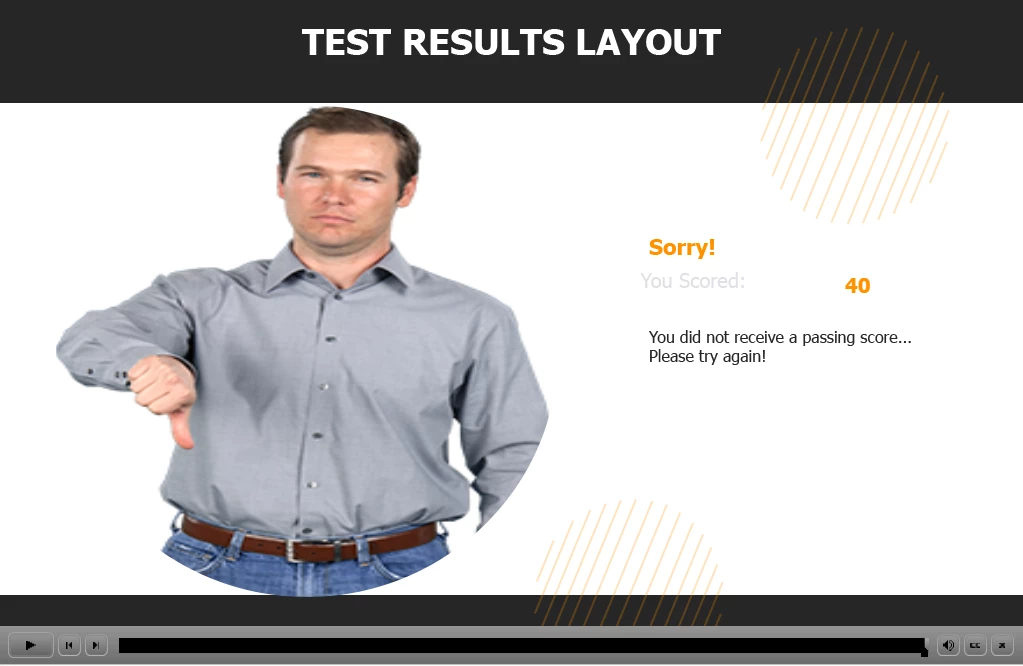
 

Under quiz preference I have tried using 75% as well and 30 points for a passing score.  I have looked under Advanced interactions to see if maybe there was another slide adding to the scoring but only the quiz questions are scored.

I think it has something to do with the test results slide itself but I can't figure out what.

    This topic has been closed for replies.
    Correct answer Lilybiri

    It would be great if you posted the full version number, because CP2019 had three main releases (11.0, 11.5 and 11.8) and multiple patch releases. You find the full version number under Help, About Captivate. Knowing the OS can also be important.

    For your question, first of all check if the Total score is indeed 40 points. Easiest way is to open Advanced Interaction panel (F9), the total score is listed there and you can find the individual scores as well. It is possible that you also have scored objects, not only scored quiz slides. More information in:

    https://blog.lilybiri.com/advanced-interaction-panel-q-and-a

    It looks like you have already checked that.


    Second question about the score slide: did you delete any embedded object (same question for the quiz slides)? Embedded objects do not have an individual timeline but have the necessary functionality. Some of those objects can be hidden using Quiz Preferences and/or their Properties panel, but not all of them. Example is the Continue button which is very important. If the screenshot in your question is the Results slide, you do have messed it up, look at the Results Master slide.

    About the Retake button: it is the normal behavior that this button will not appear if the learner has passed the quiz, it should only appear if there was a failure on quiz level. I suppose you have more than 1 attempt on quiz level.

    To debug, I would insert a text container with the quizzing system variable cpQuizInfoPointsscored on the first quiz slide, and time it for the rest of the project. When testing, check if that variable is increasing its value as expected.


    3 replies

    Participant
    October 27, 2022

    I think I had deleted something on one of the slides that was embedded.  I'm not sure what.  I opened a new project and copied everything but the quiz then recreated the quiz and it is working correctly now.  Thank You.

    Lilybiri
    Legend
    October 27, 2022

    When you compare both projects, you should be able to see what was deleted, right?

    RodWard
    Community Expert
    Community Expert
    October 27, 2022

    Please post a screenshots of your current Quiz Settings > Pass or Fail options.  It could be that you are being failed due to an additional criteria (e.g. number of slides visited).

    Lilybiri
    LilybiriCorrect answer
    Legend
    October 26, 2022

    It would be great if you posted the full version number, because CP2019 had three main releases (11.0, 11.5 and 11.8) and multiple patch releases. You find the full version number under Help, About Captivate. Knowing the OS can also be important.

    For your question, first of all check if the Total score is indeed 40 points. Easiest way is to open Advanced Interaction panel (F9), the total score is listed there and you can find the individual scores as well. It is possible that you also have scored objects, not only scored quiz slides. More information in:

    https://blog.lilybiri.com/advanced-interaction-panel-q-and-a

    It looks like you have already checked that.


    Second question about the score slide: did you delete any embedded object (same question for the quiz slides)? Embedded objects do not have an individual timeline but have the necessary functionality. Some of those objects can be hidden using Quiz Preferences and/or their Properties panel, but not all of them. Example is the Continue button which is very important. If the screenshot in your question is the Results slide, you do have messed it up, look at the Results Master slide.

    About the Retake button: it is the normal behavior that this button will not appear if the learner has passed the quiz, it should only appear if there was a failure on quiz level. I suppose you have more than 1 attempt on quiz level.

    To debug, I would insert a text container with the quizzing system variable cpQuizInfoPointsscored on the first quiz slide, and time it for the rest of the project. When testing, check if that variable is increasing its value as expected.