

Quiz Results page - continue button
Hi,
I'm already a little nervous about writing this. I'm expecting a few of the answers to say why are you doing 'xyz'? Well, thats why I'm writing this.
Using captivate 9
I wrote in this forum almost one year ago on this topic, and the answers were soooo helpful. (Captivate Quiz Results Continue button. On Success go to pass or fail slide )
I'm publishing html5 scorm and pushing to a moodle LMS.
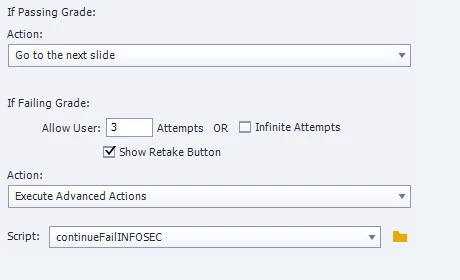
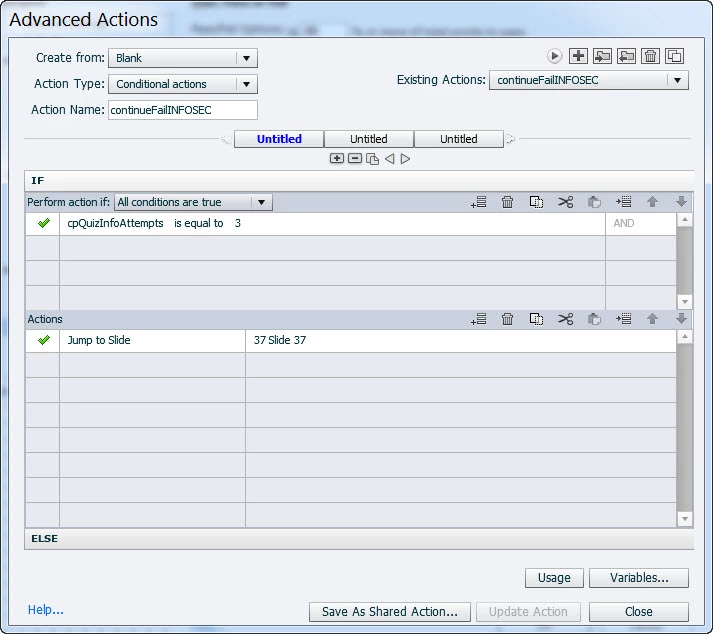
I needed to create the same type of course, with a quiz and have the quiz results page work in a specific manner. Its actually kind of a simple concept. 2 failed attempts on the quiz then you are locked out. The quiz results page on the previous course displayed only the score information, and a continue button and a retake button. Same thing I want to do now. I found out last year from your great answers that the pass fail actions in preferences actually drive the continue button. I have two slides after the quiz results. One for when you pass, the continue button goes to a page that says you passed and you can either exit or restart the course. The very last slide (slide 37) is for the continue button to send you there if you have failed both attempts. The failure slide indicates you have used all your attempts and to contact your director. In last year's case, after the first failure the continue button was inactive. This was acceptable since the retake quiz button worked fine and the quiz result page indicated the learner had failed.
The problem with the current course is the Continue button after first failure is active and goes to the next slide which tells them they passed.
I know Im getting wordy here, but in summary, after the first failure I need the continue button to either not appear or be inactive ( like in last year's course).
Please let me know if you need any more info to help me out.
 AdChoices