



Inspiring
August 8, 2023
Answered

Quiz Results Slide - Continue Button Doesn't Work - Captivate 2023

  • August 8, 2023
  • 1 reply
  • 1014 views

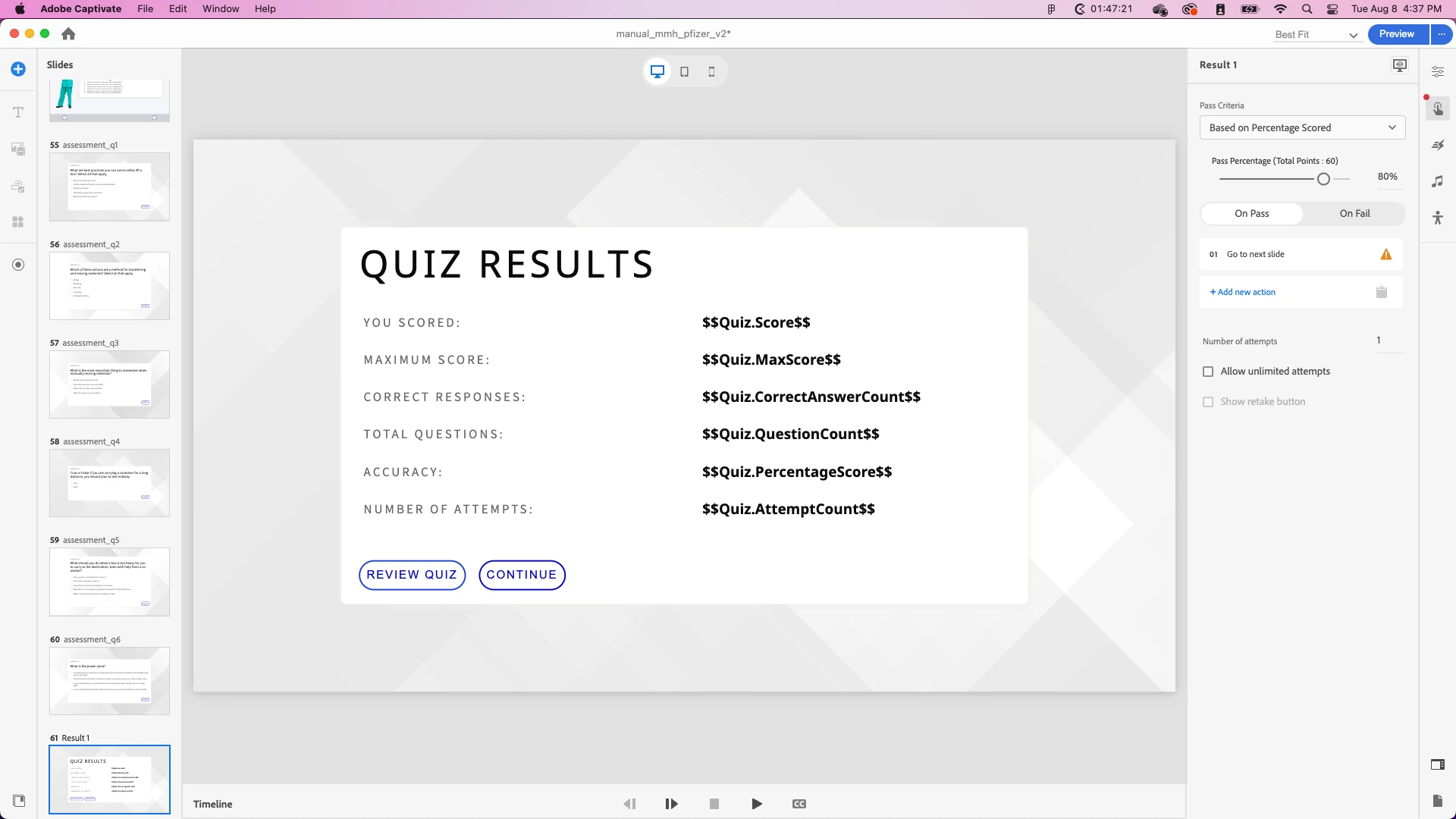
I am using Captivate 2023. When users testing my LMS module get to the end, they can't press continue. How do I edit what that button does? The normal interactions are not available. 


I am trying to create a "Yay you finished" slide or a certificate slide... is that possible? 


The On Pass and On Fail actions can be selected, but I'm not sure what to select... I could have it go to the next slide and build the "yay you finished" slide. How does the user close out their training and ensure the score is recorded? Is the score automatically recorded once the user completes the quiz?  
 

    This topic has been closed for replies.
    Correct answer Lilybiri

    Default Pass/Fail actions (in the Properties panel of the Results slide) are 'Continue'. I am not sure about the programming of this new version, but most of former features are identical here including the quizzing system variables (with changed names). That means that the data are transmitted to the LMS - if Reporting has been activated - at the end of the Results slide. Even if the Results slide is hidden (which is still possible using the right-click menu) learner needs to get 'over' the results slide. For that reason I have always recommended to add at least one slide after the results slide. A certificate slide can be a good idea, if you are able to create it with the canned slides and containers.

    Just updated to 12.1.0.16. The default actions for Pass/Fail in the Interaction panel for the Results slide are 'Go to Next Slide'. However you'll see a warning sign when there is NO slide after the Results slide. You need to add a slide to enable the actions which are triggered by the Continue button.

    1 reply

    Lilybiri
    LilybiriCorrect answer
    Legend
    August 9, 2023

    Default Pass/Fail actions (in the Properties panel of the Results slide) are 'Continue'. I am not sure about the programming of this new version, but most of former features are identical here including the quizzing system variables (with changed names). That means that the data are transmitted to the LMS - if Reporting has been activated - at the end of the Results slide. Even if the Results slide is hidden (which is still possible using the right-click menu) learner needs to get 'over' the results slide. For that reason I have always recommended to add at least one slide after the results slide. A certificate slide can be a good idea, if you are able to create it with the canned slides and containers.

    Just updated to 12.1.0.16. The default actions for Pass/Fail in the Interaction panel for the Results slide are 'Go to Next Slide'. However you'll see a warning sign when there is NO slide after the Results slide. You need to add a slide to enable the actions which are triggered by the Continue button.

    Inspiring
    August 10, 2023

    Ah, I see. Thank you very much for the reply! Now... to see if I can create a certificate with canned slides. LOL - That will be the challenge! 

    Lilybiri
    Legend
    August 10, 2023

    Success!

    It is not all shtat intuitive, isn't it?
