
Known Participant
June 19, 2019
Question

Quiz Workflow

  • June 19, 2019
  • 2 replies
  • 439 views

Hi Everyone,

In the Quiz result slide, is there a way to recreate the retake and review button to be placed on different slides?
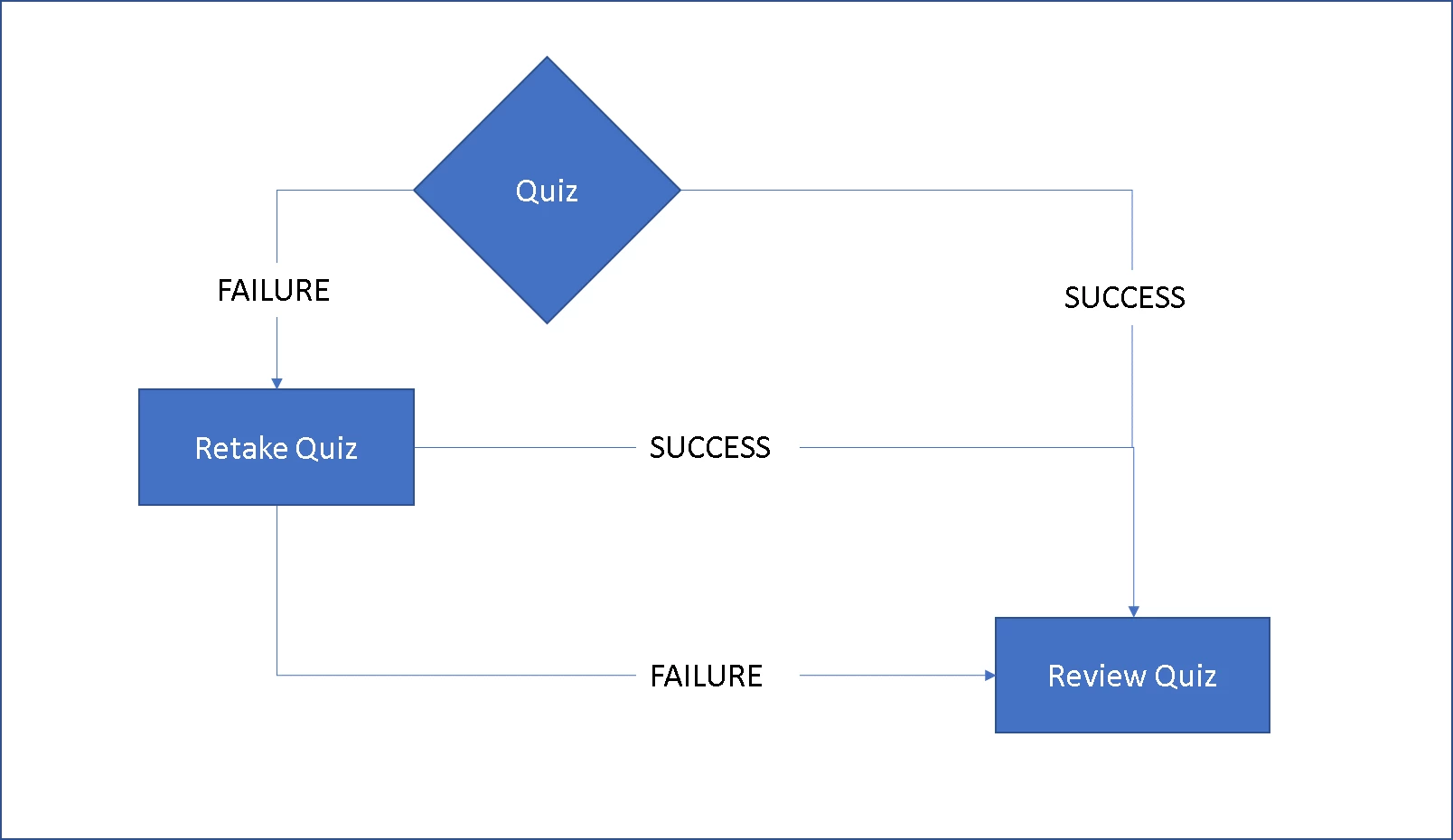
Logic behind the workflow is if a learner fails the quiz on first attempt he needs to retake. Again on retake, the user should be able to Review the quiz.

Once the review is complete only then, the learner should be able to Continue to the next slide. Currently, I am thinking that if i can recreate the retake button functionality and review quiz functionality then if i create two separate pass/ fail slide.

Regards,

Sid

This topic has been closed for replies.

2 replies

RodWard
Community Expert
Community Expert
June 19, 2019

From an instructional point of view you need to consider carefully how you approach this problem because if you handle it the wrong way all you are really doing is allowing your learners to cheat.

If you let them fail the quiz then see all the correct answers in the Review, then retake the quiz immediately again to plug in the correct answers, how does that prove they have mastered the topic?  Word will very quickly get around that all you have to do is skip to the quiz as quickly as possible, plug in any answer you want to fail the first time around, then do the Review to see that the right answers are, and then ace the quiz without any effort (or learning) required.

I would suggest that if your learner has failed the quiz by a wide margin (and you can determine this with the scoring variables) then they should be redoing the content again, not just reviewing the quiz to see correct answers.

I think the Captivate designers got this one right.  Invoking the Review Quiz terminates all further attempts on the quiz in that session.  A restart from the LMS is then required to perform another attempt.  Then the choice is with the Course Designer as to whether they want to allow the learner another attempt immediately or whether they require the learner to make a more careful examination of the content.

Known Participant
June 19, 2019

Hi Rod,

Thank you for the detailed explanation.

I am thinking of placing the Retake button on top of the Review Quiz button and enabling the continue button only when someone has reviewed the quiz to enhance retention.

What got me intrigued is how do we send the learner to the first slide if he has scored badly or below threshold or move them to first question slide if they missed the passing grade narrowly.

Thanks,

Sid

Lilybiri
Legend
June 19, 2019

The recommendation to put the Review button under the Retake button is in the post I referred to, as are more tweaks....

I have a blog post about retaking the whole course before allowing a retake as well.  Maybe you don't like reading, tell me in that case.

Lilybiri
Legend
June 19, 2019

Answer to your first question is NO.

Idf you want that amount of control you have two options:

  1. Do not use the default quiz/ score slide but create everything as custom slides
  2. Tweaking quiz/score slides could solve some of your requirements, have explained several of them in blog posts.

Here are two  links:. In both locations you can find a lot more.

Custom Review - Captivate blog

Quiz Tweaks 5: Results slide - eLearning